# Managing surveys
## Creating a survey
[Read more about creating a survey here](https://help.swarmia.com/use-cases/run-developer-experience-surveys/creating-a-survey).
## Survey actions
Here's what you can do to draft live, unpublished, and published surveys on the [**Surveys**](https://app.swarmia.com/surveys) tab.
You can access the following actions by clicking `...` in the *Actions* column:
### **Preview**
Open a popup showing how the respondents saw, see, or will see the survey. You can respond as if you belong to any team, but your submission won't be recorded.
### **Duplicate**
Start creating a new survey based on another one. You can make changes before [launching the new survey](https://help.swarmia.com/use-cases/run-developer-experience-surveys/creating-a-survey).
### **Close**
Close a live survey for responses and [access the results](https://help.swarmia.com/use-cases/run-developer-experience-surveys/viewing-and-sharing-survey-results). A closed survey can't be re-opened.
### **Delete**
Permanently delete a survey or draft.
### **Edit survey**
Add new teams to audience, or change the end date.
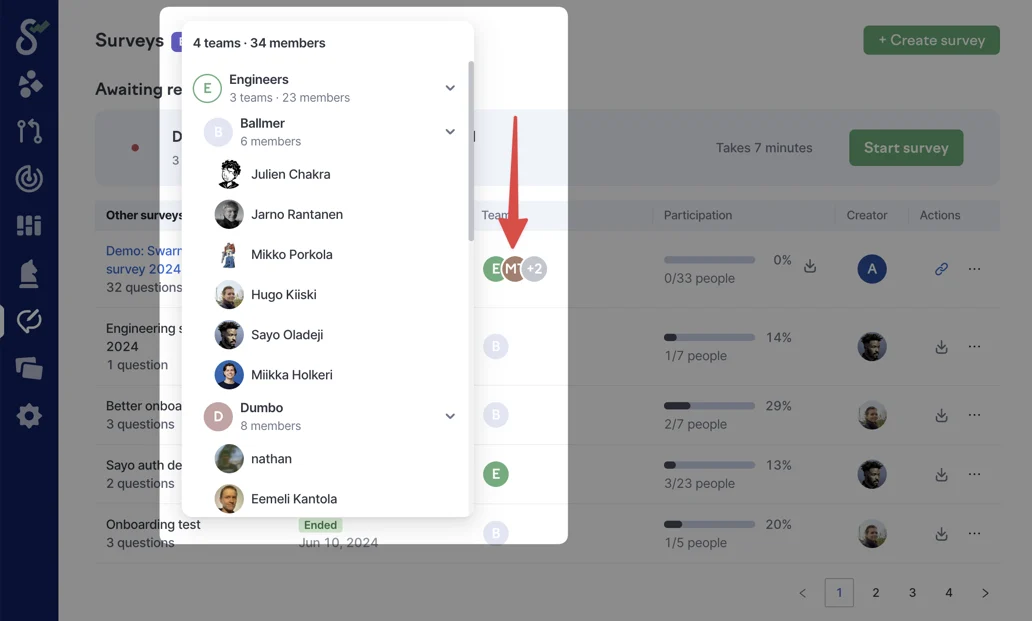
### View the survey audience
To see the exact people included in the survey audience, click the team avatars in the *Teams* column.
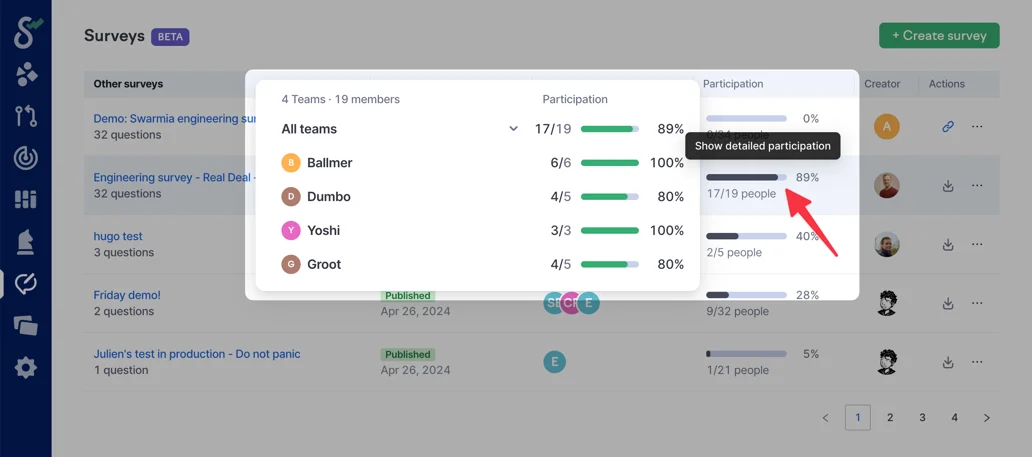
### View participation by the team
Click the indicator in the *Participation* column to see the response rates in each team. It’s also available for live surveys to help remind the teams that are falling behind others.