> For the complete documentation index, see [llms.txt](https://help.swarmia.com/llms.txt). Markdown versions of documentation pages are available by appending `.md` to page URLs; this page is available as [Markdown](https://help.swarmia.com/settings/organization/configuring-deployments-in-swarmia/generate-deployments-via-the-deployment-api/generate-deployments-for-monorepos.md).
# Generate deployments for monorepos via the API
How to setup the Swarmia deployments API to track deployments from monorepos
Swarmia supports tracking deployments from [monorepos](https://monorepo.tools/) (repositories that contain code for multiple applications that are deployed separately) with some additional setup. For this use case, you will need to use the deployments API.
With monorepos, the challenge is in determining which commits (and thus pull requests) belong to which deployment apps. The deployments API provides two ways for this.
## **Option 1: Differentiate based on which files changed**
The deployments API supports filtering associated PRs based on which files they touch via the `filePathFilters` field. This can be a good approach if your monorepo has a separate folder for each service. For example, let's say that you have a service defined in `services/service-1`.
When this service is deployed, you would send a deployment to the deployments API with these fields:
```json
{
"appName": "monorepo/service-1",
"version": "v2.0.5",
"environment": "production",
"commitSha": "fc24ab8620f41a0ece6541004f1b4e610bc5767b",
"repositoryFullName": "octocat/monorepo",
"filePathFilters": ["service-1/"]
}
```
We will then look up all the commits between this new deployment and the previous deployment of the same app (based on the `commitSha` fields). We will find PRs associated with the commits, and then we will filter the PRs based on the `filePathFilters` so that only PRs that include changes to `service-1/` will be included in the deployment.
As a result, PRs from other services in the monorepo will be ignored and your DORA metrics will be tracked correctly.
We do not currently support glob patterns for this field. If your app is spread out over multiple folders in a complex manner, the second option described below might be more convenient for you.
See the [full field reference for `filePathFilters`](/settings/organization/configuring-deployments-in-swarmia/generate-deployments-via-the-deployment-api.md#optional-fields).
#### Deploying to multiple environments from the same repo
By default, when a pull request is included in deployments to multiple environments, it appears in all of them. This is the correct behavior for most setups: for example, when deploying the same service to staging and then production, or rolling out across multiple regions.
However, some teams use a single deployment app to track a GitOps monorepo where different environments represent entirely different services or components. In these setups, the same commit range can span multiple services, causing pull requests to be incorrectly attributed to environments they don't belong to.
**Unique PRs across environments** in [deployments settings](https://app.swarmia.com/settings/deployments) solves this. When enabled, Swarmia attributes each pull request to only the first environment it's deployed to. If a PR was already included in a deployment to another environment, it won't appear in subsequent deployments to different environments.
## **Option 2: Tell us which commits were deployed**
If you need even more granular control than what `filePathFilters` provides, you can use your own logic to determine which commits (and thus pull requests) should be included in the deployment of the service.
For this you would send us data like this
```json
{
"appName": "monorepo/service-1",
"version": "v2.0.5",
"environment": "production",
"commitSha": "fc24ab8620f41a0ece6541004f1b4e610bc5767b",
"repositoryFullName": "octocat/monorepo",
"includedCommitShas": [
"fc24ab8620f41a0ece6541004f1b4e610bc5767b",
"9f08ee13c1ca9fb4ac9635290ab754f734d4c7f2",
"83a129c486d70d2ae855a7b69110e26649d2ed98"
]
}
```
We will then use the `includedCommitShas` to determine which pull requests should be included in this deployment.
You can also use `includedCommitShas` in combination with `filePathFilters` if you for some reason need to.
See the [full field reference for `includedCommitShas`](/settings/organization/configuring-deployments-in-swarmia/generate-deployments-via-the-deployment-api.md#optional-fields).
{% hint style="warning" %}
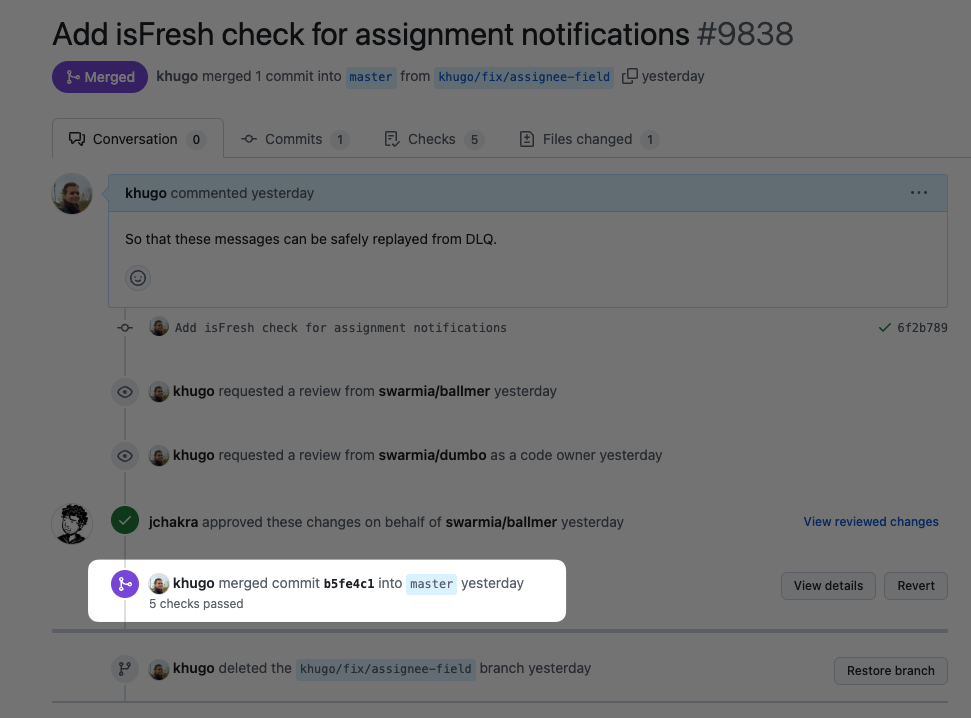
For the pull request detection to work, it is required that you include the "merge commit hash" of each deployed pull request in the list of included commits. You can find the merge commit hash from the GitHub UI (see screenshot below)
{% endhint %}
Keep these constraints in mind when you generate the list:
* Every entry must be a **full** commit SHA. Abbreviated SHAs are rejected, and the whole deployment is dropped.
* `commitSha` and `repositoryFullName` are required alongside `includedCommitShas`.
* If your script produces an empty list, omit the field rather than sending `[]`, which is rejected.
* The maximum is 10,000 entries.
---
# Agent Instructions
This documentation is published with GitBook. GitBook is the documentation platform designed so that both humans and AI agents can read, navigate, and reason over technical content effectively. Learn more at gitbook.com.
## Querying This Documentation
If you need additional information that is not directly available in this page, you can query the documentation by asking a question.
Perform an HTTP GET request on the following URL with the `ask` and `goal` query parameters:
```
GET https://help.swarmia.com/settings/organization/configuring-deployments-in-swarmia/generate-deployments-via-the-deployment-api/generate-deployments-for-monorepos.md?ask=&goal=
```
`ask` is the immediate question: it should be specific, self-contained, and written in natural language.
`goal` is what the user is ultimately trying to achieve, the reason they need the answer. Sharing it helps GitBook give you a better, more relevant answer. A goal is most helpful when it describes the outcome the user wants rather than restating the question. For example, with `ask=how do I create an API token`, a goal like `automate deployments from our CI pipeline` lets GitBook tailor the answer to that use case.
The response will contain a direct answer to the question and relevant excerpts and sources from the documentation.
Use this mechanism when the answer is not explicitly present in the current page, you need clarification or additional context, or you want to retrieve related documentation sections.