> For the complete documentation index, see [llms.txt](https://help.swarmia.com/llms.txt). Markdown versions of documentation pages are available by appending `.md` to page URLs; this page is available as [Markdown](https://help.swarmia.com/settings/organization/configuring-deployments-in-swarmia.md).
# Deployments
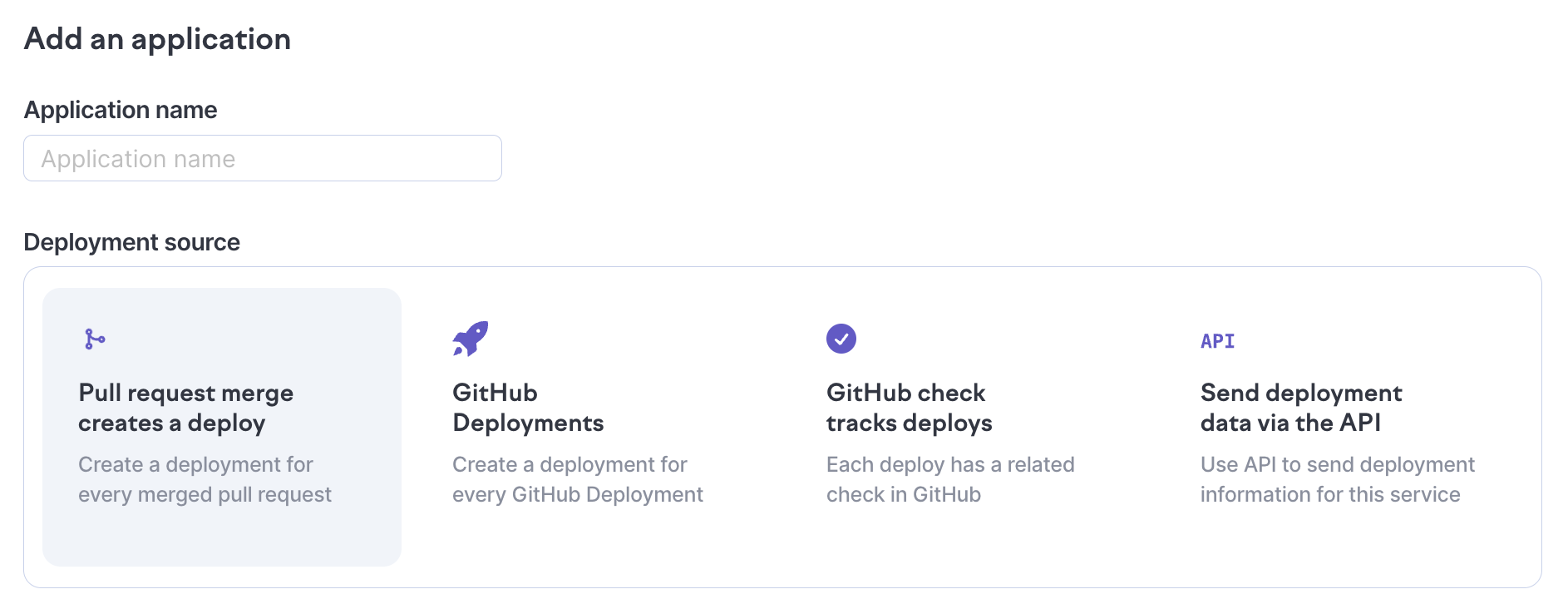
Set up deployments by creating an application and selecting your source.
## About deployments
Deployments are used as the data source of [DORA metrics](/features/metrics/track-dora-metrics.md), which provide visibility into the frequency and quality of deployments:
* Deployment frequency & total count of deployments
* Change failure rate (CFR), or how often you deploy defects into production
* Mean time to recovery (MTTR), the average time it takes to address defects
{% content-ref url="/pages/GjGaxV6UL0Dckj0mJOH8" %}
[DORA metrics](/features/metrics/track-dora-metrics.md)
{% endcontent-ref %}
## Setting up deployment apps
1. Navigate to [Settings → Deployments](https://app.swarmia.com/settings/deployments)
2. Create a **new application** to configure the deployments for
3. Configure your **deployment data source** *(see below for source-specific instructions)*
4. Select additional production environments for the app (optional) to calculate DORA metrics.
### **Deployment data sources**
You can use a variety of data sources for getting deployments to show on Swarmia:
* [**Merged pull requests**](/settings/organization/configuring-deployments-in-swarmia/generate-deployments-from-merged-pull-requests.md) — use merges into a specific branch as the proxy for deployments
* [**GitHub Checks**](/settings/organization/configuring-deployments-in-swarmia/generate-deployments-from-github-checks.md) — automatically create deployments from your CI/CD pipeline based on repository, check, and branch configurations
* [**GitHub Deployments**](/settings/organization/configuring-deployments-in-swarmia/generate-deployments-from-github-deployments.md) — automatically create deployments based on GitHub Deployments
* [**Deployments API**](/settings/organization/configuring-deployments-in-swarmia/generate-deployments-via-the-deployment-api.md) — send deployment information directly, supports multiple environments
### **Comparison of data sources**
| | **Merged pull requests** | **GitHub Checks** | **GitHub Deployments** | **Deployments API** |
| -------------------------------------------------------------------------------------------------------------------- | ------------------------ | ---------------------------------- | ---------------------------------- | --------------------------------------- |
| [Deployment frequency](/definitions/dora-metrics/deployment-frequency.md) | ✅ | ✅ | ✅ | ✅ |
| [Time to deploy](/definitions/dora-metrics/time-to-deploy.md) | ❌ | ✅ | ✅ | ✅ |
| [Change lead time](/definitions/dora-metrics/change-lead-time.md) | Without time to deploy | ✅ | ✅ | ✅ |
| [Change failure rate](/definitions/dora-metrics/change-failure-rate.md) | ✅ | ✅ | ✅ | ✅ |
| [Mean time to recovery (MTTR)](/definitions/dora-metrics/mean-time-to-recovery.md) | ✅ | ✅ | ✅ | ✅ |
| [Automatic change failure detection](https://help.swarmia.com/track-dora-metrics/automatic-change-failure-detection) | Reverts, Hotfix filters | Reverts, Rollbacks, Hotfix filters | Reverts, Rollbacks, Hotfix filters | Reverts, Rollbacks, Hotfix filters, API |
| Multiple environments | ✅ | ✅ | ✅ | ✅ |
## Configuring production environments
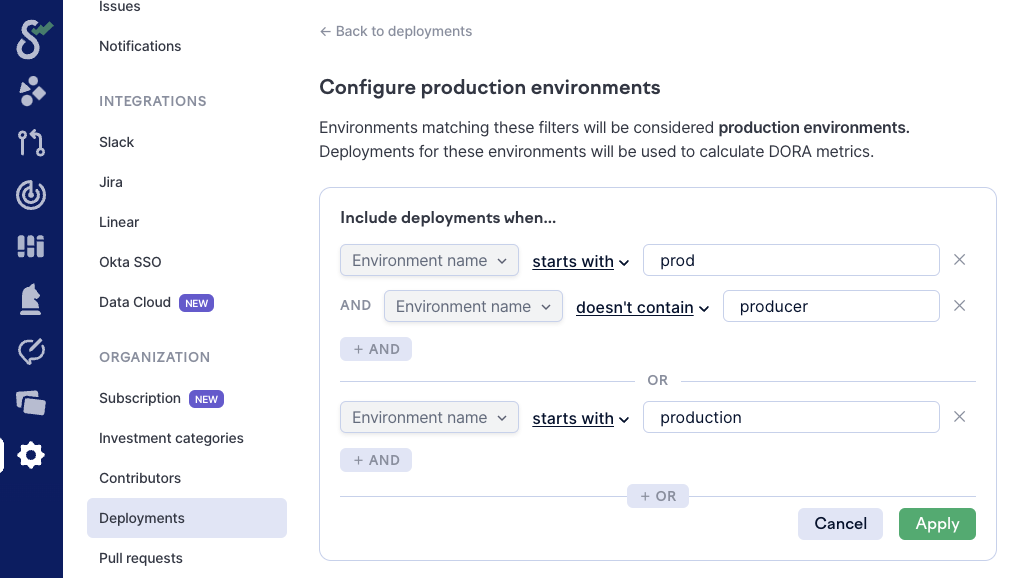
You can configure environments as production for your deployments. Any deployments made to the production environments will be used to calculate [DORA metrics](https://help.swarmia.com/deployment-insights), and appear by default in [Infrastructure → Deployments](https://app.swarmia.com/infrastructure/deployments).
By default, Swarmia treats an environment as production when its name starts with `prod` or contains `production`, ignoring capitalization. Names like `live`, `prd`, or `main` don't match, so add a filter for them if you use them.
1. Navigate to [Settings → Deployments](https://app.swarmia.com/settings/deployments)
2. [Configure production environments](https://app.swarmia.com/settings/deployments/production-environments). Leverage your environment naming conventions and set up filters to assign environments as production. You need to be an [admin](https://help.swarmia.com/users-and-roles) to set this up.
3. Members can also set up production environments for individual apps in addition to these filters.
## **Frequently asked questions**
### **Which data source should I use?**
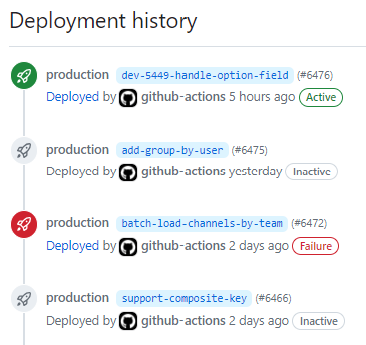
If you're already using **GitHub Deployments** in your release workflow, there's no need to manually create a deployment app. Swarmia automatically tracks those, making it the preferred method for a quick start.
GitHub Deployments with three succeeded deployments and one failure.
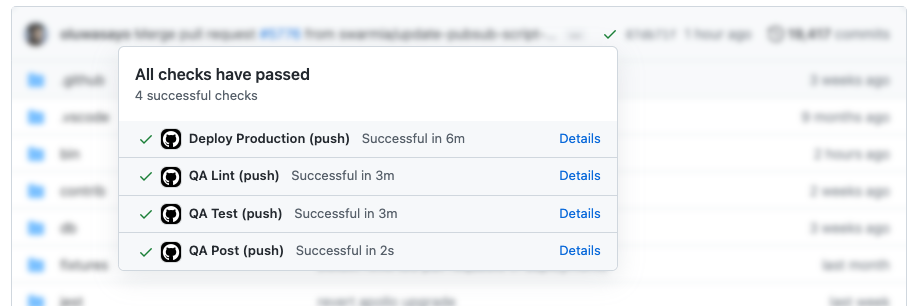
Most CI/CD tools have a GitHub integration that can report your deployment job status back to GitHub. If GitHub Deployments are not readily available, but your deployment status is visible in GitHub as a check, using **GitHub Checks** could be suitable.
GitHub checks list with a successful "Deploy Production" check.
These are the fastest ways to get started with Deployment insights and allows Swarmia to backfill historical data automatically. You can also later update your application from one deployment source to another without losing historical data.
We recommend using the **Deployments API** in the cases where:
* You deploy manually.
* Your CI/CD pipeline does not report deployments back to GitHub.
* You need multiple environments.
* You want to automate additional change failures (in addition to reverts and rollbacks).
### **Is it possible to backfill more than 90 days of deployment data?**
Yes, in certain cases it's possible. If you're using **Deployments API** and have the historical data stored somewhere, you can send it to Swarmia and it will be shown as expected. If you're using **GitHub Deployments**, longer backfills are available for select Standard customers. Reach out to us at for more information.
### **How do I set up deployments in a monorepo?**
Swarmia supports tracking deployments from [monorepos](https://monorepo.tools/) (repositories that contain code for multiple applications that are deployed separately) with some additional setup. For this use case, you will need to use the deployments API.
Read more here:
{% content-ref url="/pages/wDudV4eMechHLjbWszCH" %}
[Generate deployments for monorepos via the API](/settings/organization/configuring-deployments-in-swarmia/generate-deployments-via-the-deployment-api/generate-deployments-for-monorepos.md)
{% endcontent-ref %}
---
# Agent Instructions
This documentation is published with GitBook. GitBook is the documentation platform designed so that both humans and AI agents can read, navigate, and reason over technical content effectively. Learn more at gitbook.com.
## Querying This Documentation
If you need additional information that is not directly available in this page, you can query the documentation by asking a question.
Perform an HTTP GET request on the following URL with the `ask` and `goal` query parameters:
```
GET https://help.swarmia.com/settings/organization/configuring-deployments-in-swarmia.md?ask=&goal=
```
`ask` is the immediate question: it should be specific, self-contained, and written in natural language.
`goal` is what the user is ultimately trying to achieve, the reason they need the answer. Sharing it helps GitBook give you a better, more relevant answer. A goal is most helpful when it describes the outcome the user wants rather than restating the question. For example, with `ask=how do I create an API token`, a goal like `automate deployments from our CI pipeline` lets GitBook tailor the answer to that use case.
The response will contain a direct answer to the question and relevant excerpts and sources from the documentation.
Use this mechanism when the answer is not explicitly present in the current page, you need clarification or additional context, or you want to retrieve related documentation sections.