> For the complete documentation index, see [llms.txt](https://help.swarmia.com/llms.txt). Markdown versions of documentation pages are available by appending `.md` to page URLs; this page is available as [Markdown](https://help.swarmia.com/settings/integrations/ai-coding-tool-integrations/claude-code-integration.md).
# Claude Code integration
Enabling Claude Code metrics with the Claude Code Analytics API, Claude Enterprise Analytics API, or OpenTelemetry monitoring
Read more about Swarmia's other [AI coding tool integrations](/settings/integrations/ai-coding-tool-integrations.md) and [understanding the impact of AI tools](/guides/understand-the-impact-of-ai-tools.md).
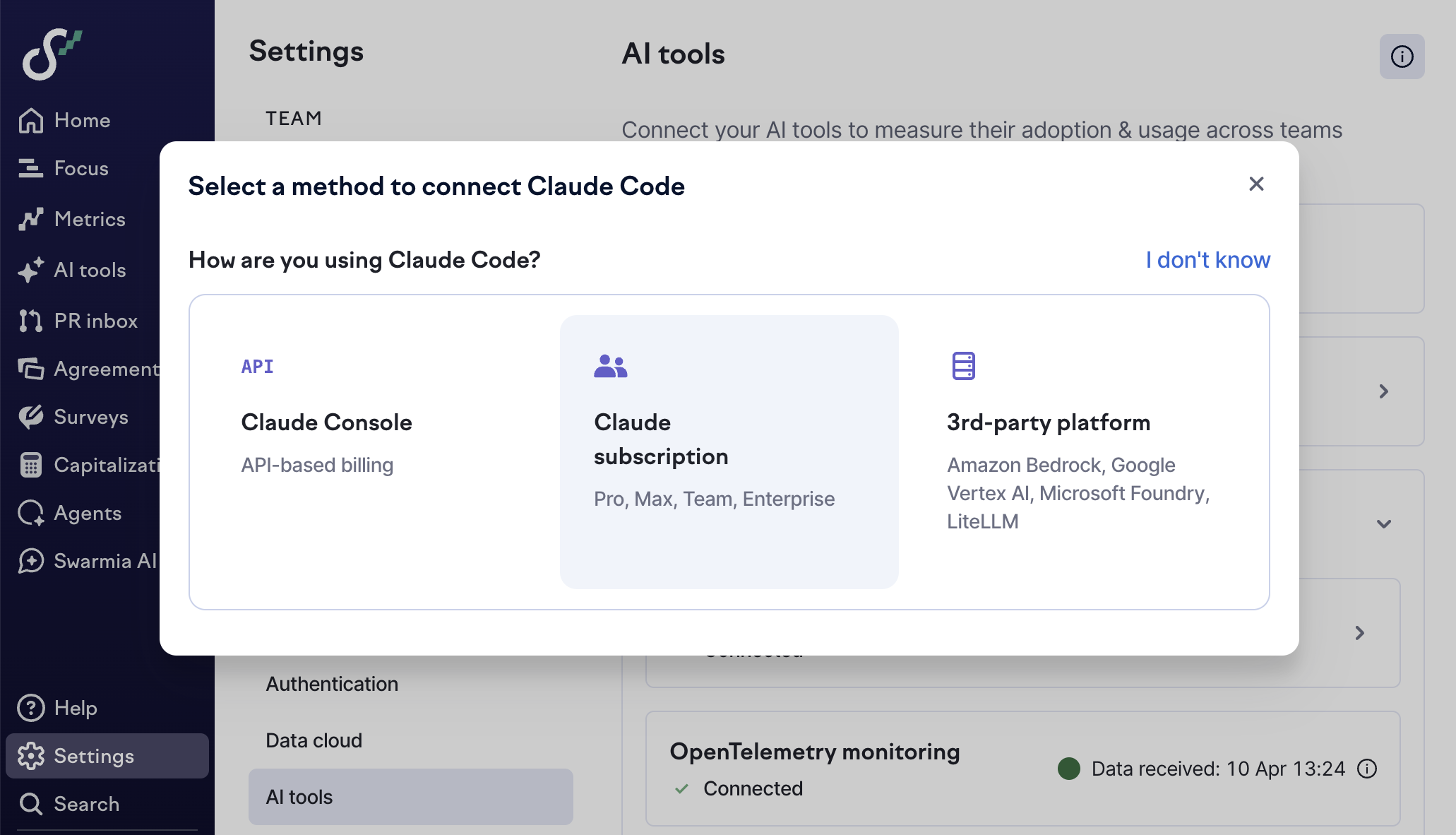
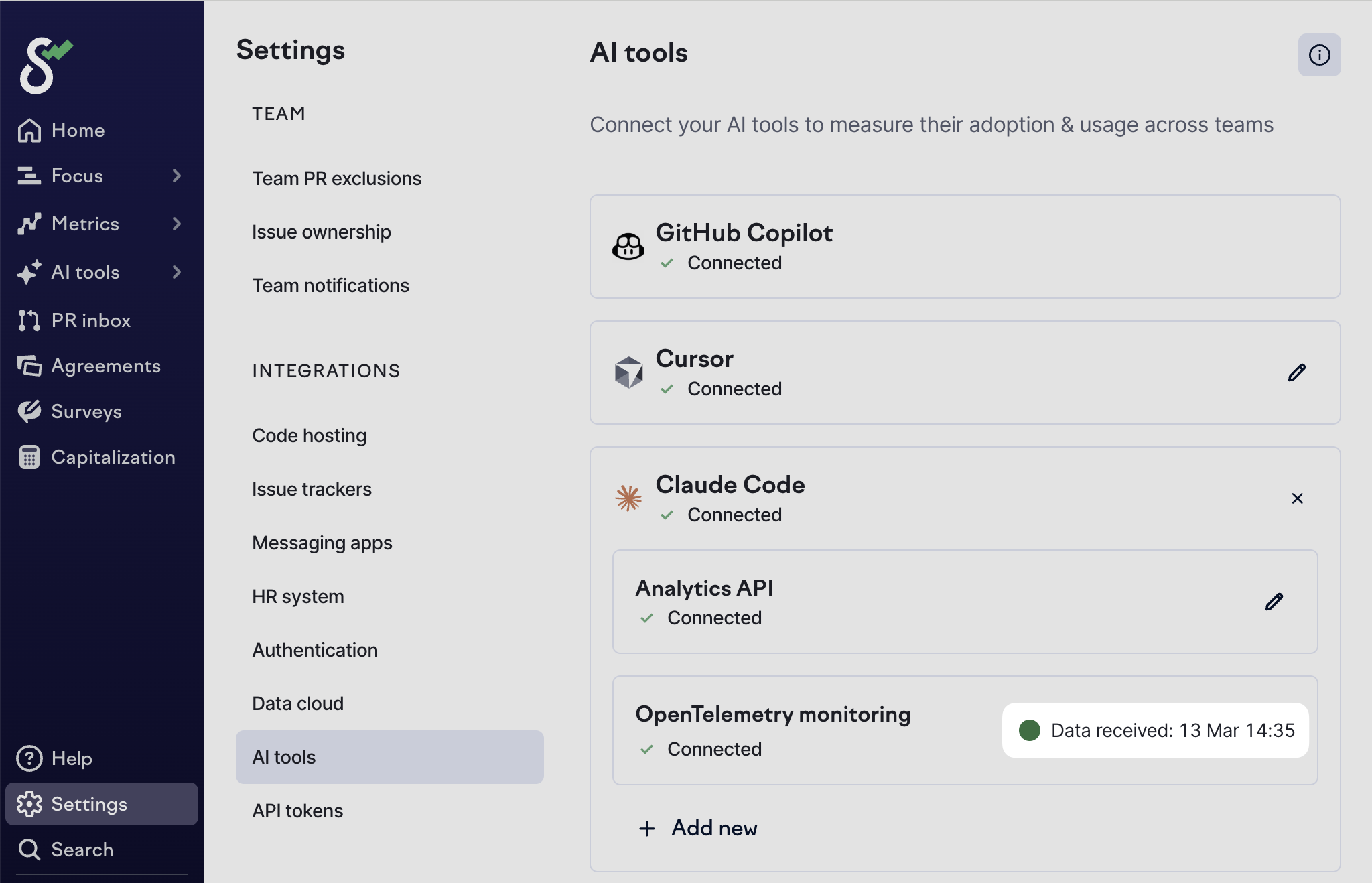
There are multiple ways to run Claude Code, each with a different set of supported integration options for getting your data into Swarmia. For a quick overview of the options and compatibility, see the table below. You can just go to [Settings → AI tools → Claude Code](https://app.swarmia.com/settings/ai-assistants), click "Add new", and Swarmia guides you through the setup.
If you're unsure which authentication method you're using, see [*How do I know which authentication method I'm using?*](#how-do-i-know-which-authentication-method-im-using) below.
| |
Claude Console
(API-based billing)
|
Team plan
(Usage included in subscription)
|
Enterprise plan
(Seat price + usage at API rates)
|
3rd-party platform
(Amazon Bedrock, Google Vertex AI, Microsoft Foundry, and LiteLLM)
|
| ------------------------------------------------ | ---------------------------------------------------------------- | ------------------------------------------------------------------------ | ------------------------------------------------------------------------------- | ------------------------------------------------------------------------------------------------------------------- |
| **Claude Code Analytics API** | :white\_check\_mark: Recommended | :x: Not available | :x: Not available | :x: Not available |
| **Claude Enterprise Analytics API** | :x: Not available | :x: Not available | :white\_check\_mark: Recommended | :x: Not available |
| **OpenTelemetry:** managed settings in Claude.ai | :x: Not available | :white\_check\_mark: Recommended | :heavy\_check\_mark: Available | :x: Not available |
| **OpenTelemetry:** managed settings in MDM | :heavy\_check\_mark: Available | :heavy\_check\_mark: Available | :heavy\_check\_mark: Available |
✅ Recommended (requires user email)
|
We recommend using [Claude Code's default attribution settings](https://code.claude.com/docs/en/settings#attribution-settings) for commit and PR messages, since those are used in Swarmia's [automatic AI tool detection](/features/ai-tools/ai-tool-detection-and-filters.md).
You can enable multiple Claude Code integration options in the same Swarmia workspace. For example, if some developers use Claude Console and others use an Enterprise plan, you can connect both the Claude Code Analytics API and the Claude Enterprise Analytics API. Swarmia deduplicates overlapping activity so the same usage is not counted twice.
## Claude Code Analytics API
{% hint style="info" %}
Claude Code Analytics API availability:
* :white\_check\_mark: Claude Console
* :x: Team plan
* :x: Enterprise plan
* :x: 3rd-party platform
If you're unsure which authentication method you're using, see [*How do I know which authentication method I'm using?*](#how-do-i-know-which-authentication-method-im-using) below.
{% endhint %}
[Create a Claude Code Admin API key](https://console.anthropic.com/settings/admin-keys) (note that these differ from the standard API keys) and copy it to [Settings → AI tools → Claude Code](https://app.swarmia.com/settings/ai-assistants) in Swarmia. You need to be a Claude organization admin to create Admin API keys. We fetch 30 days of historical activity data upon connection.
{% hint style="warning" %}
The historical [*enabled users*](/features/ai-tools/ai-adoption.md) don't include people who had a license but got removed before you connected Claude Code to Swarmia.
{% endhint %}
## Claude Enterprise Analytics API
{% hint style="info" %}
Claude Enterprise Analytics API availability:
* :x: Claude Console
* :x: Team plan
* :white\_check\_mark: Enterprise plan
* :x: 3rd-party platform
If you're unsure which authentication method you're using, see [*How do I know which authentication method I'm using?*](#how-do-i-know-which-authentication-method-im-using) below.
{% endhint %}
1. As the primary owner of your organization on an Enterprise plan, turn on public API access in [Organization settings → API](https://claude.ai/admin-settings/api-access).
2. Create an Analytics API key with the `read:analytics` scope and copy it. Claude shows the key only once.
3. In Swarmia, go to [Settings → AI tools → Claude Code](https://app.swarmia.com/settings/ai-assistants), click "Add new", and select **Enterprise plan**.
4. Paste the key into **Claude Enterprise Analytics API key** and click **Apply**.
We fetch up to one year of historical activity data upon connection. The Claude Enterprise Analytics API doesn't have data from before January 1, 2026. Swarmia matches each Claude user to a contributor by email.
{% hint style="warning" %}
The Claude Enterprise Analytics API option has these limitations:
* **Metrics lag by about a day:** Anthropic publishes the data for each day on the following day. Anthropic can also revise cost data for up to a week after the end of the month, and Swarmia picks up the revisions automatically.
* **No data on idle users:** The API only reports people who used Claude that day, so there's no visibility into people who have a seat but are not using it. Consequently, [*enabled users*](/features/ai-tools/ai-adoption.md) only include *active users*.
{% endhint %}
## OpenTelemetry monitoring
Claude Code’s [OpenTelemetry monitoring](https://code.claude.com/docs/en/monitoring-usage) lets your users send event-level data directly to Swarmia. If you already send Claude Code metrics to another destination, [configure an OpenTelemetry Collector to forward them to both destinations](/settings/integrations/ai-coding-tool-integrations/claude-code-integration/claude-code-otel-collector.md) instead.
To enable the integration, add the following JSON through managed settings, each user's `~/.claude/settings.json`, or the shell environment that starts Claude Code. The supported organization-wide rollout options are explained below. See [Claude Code's settings precedence](https://code.claude.com/docs/en/settings#settings-precedence) for more information about the priority order of settings.
```json
{
"env": {
"CLAUDE_CODE_ENABLE_TELEMETRY": "1",
"OTEL_METRICS_EXPORTER": "otlp",
"OTEL_EXPORTER_OTLP_PROTOCOL": "http/json",
"OTEL_EXPORTER_OTLP_METRICS_ENDPOINT": "https://hook.swarmia.com/otel/v1/metrics",
"OTEL_EXPORTER_OTLP_METRICS_TEMPORALITY_PREFERENCE": "delta",
"OTEL_METRIC_EXPORT_INTERVAL": "600000",
"OTEL_EXPORTER_OTLP_HEADERS": "Authorization=",
"OTEL_RESOURCE_ATTRIBUTES": "user.email=developer@example.com"
}
}
```
* `"OTEL_RESOURCE_ATTRIBUTES": "user.email=developer@example.com"` is **required only if you're using Claude Code via a 3rd-party platform** (Amazon Bedrock, Google Vertex AI, Microsoft Foundry, and LiteLLM) so that Swarmia can match the activity to the right author.
* Replace `` with a key you can generate in [Settings → AI tools → Claude Code](https://app.swarmia.com/settings/ai-assistants) by clicking "Add new" and "Click to reveal".
{% hint style="warning" %}
The OpenTelemetry monitoring option has these limitations:
* **No historical backfill:** Swarmia collects the events in real time, and there's no way to fetch data from the time before you enabled the integration.
* **No data on idle users:** Swarmia receives only usage data, so there's no visibility into people who have a license but are not using it. Consequently, [*enabled users*](/features/ai-tools/ai-adoption.md) only include *active users*.
{% endhint %}
For an organization-wide rollout, use one of these managed settings options.
### Managed settings in Claude.ai
{% hint style="info" %}
Managed settings in Claude.ai availability:
* :x: Claude Console
* :white\_check\_mark: Team plan
* :white\_check\_mark: Enterprise plan
* :x: 3rd-party platform
If you're unsure which authentication method you're using, see [*How do I know which authentication method I'm using?*](#how-do-i-know-which-authentication-method-im-using) below.
{% endhint %}
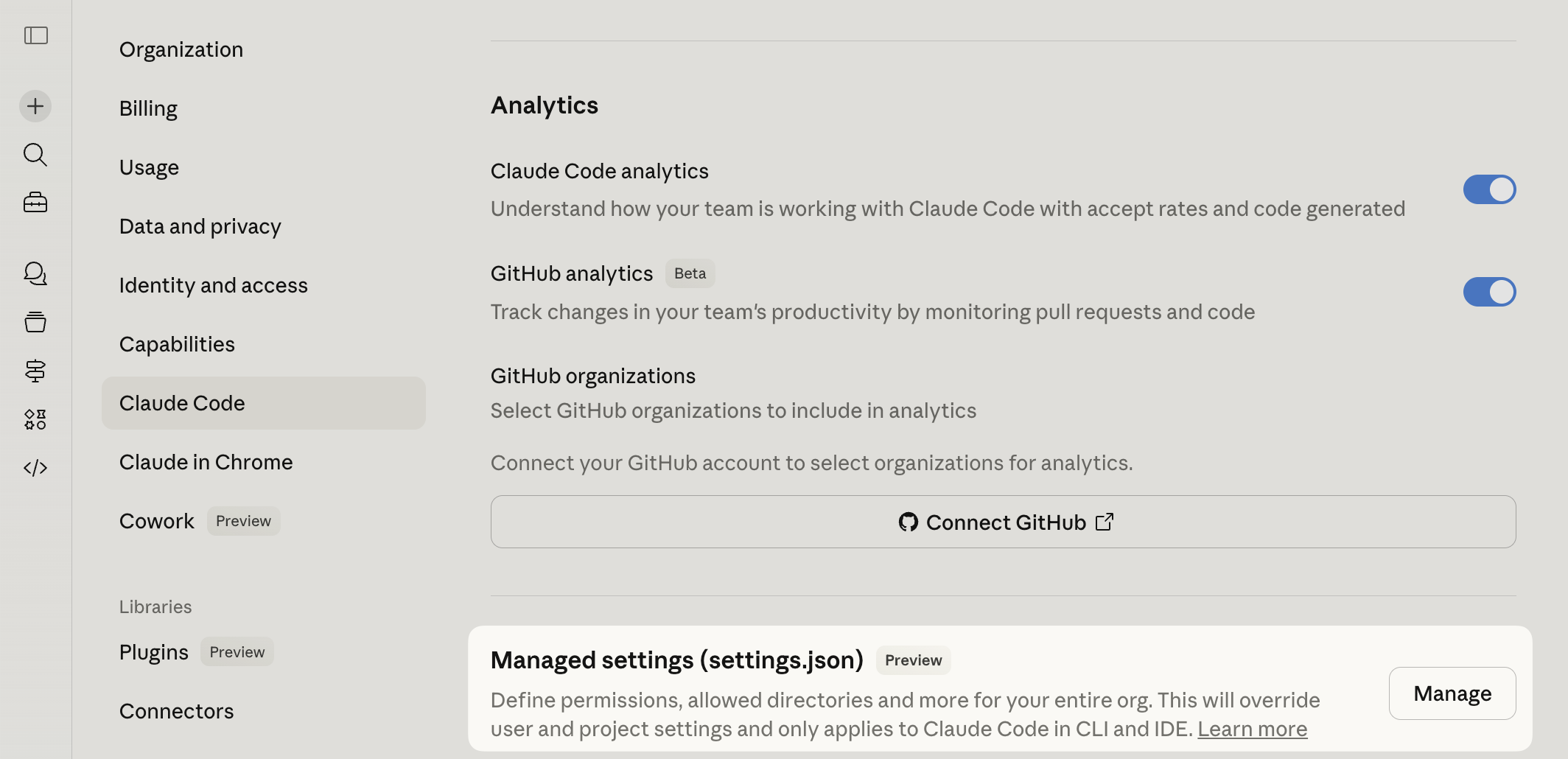
Add the JSON configuration to the [Claude.ai managed settings](https://claude.ai/admin-settings/claude-code).
Claude Code users will see a warning when you update the managed settings:
{% hint style="warning" %}
Claude Code usage from the **Claude Desktop** app is included in OpenTelemetry monitoring, but its users must first approve the Claude.ai managed settings in **Claude Code CLI**. If you're having problems, try re-logging in with the Claude subscription using `/login`.
{% endhint %}
### Managed settings in MDM
{% hint style="info" %}
Managed settings in MDM availability:
* :white\_check\_mark: Claude Console
* :white\_check\_mark: Team plan
* :white\_check\_mark: Enterprise plan
* :white\_check\_mark: 3rd-party platform (requires user email)
If you're unsure which authentication method you're using, see [*How do I know which authentication method I'm using?*](#how-do-i-know-which-authentication-method-im-using) below.
{% endhint %}
Deploy the JSON configuration via device management (e.g., MDM) to all users, e.g., `/Library/Application Support/ClaudeCode/managed-settings.json`. Claude Code treats managed settings as the highest-precedence settings scope, so users can't override them with command line arguments, local settings, project settings, or user settings. [Read more in Claude Code Docs](https://code.claude.com/docs/en/settings#how-scopes-interact).
You can find starter templates for Jamf, Iru, Intune, and Group Policy in Anthropic's [MDM examples repository](https://github.com/anthropics/claude-code/tree/main/examples/mdm).
## Frequently asked questions
### How do I know which authentication method I'm using?
{% hint style="info" %}
You can also see the currently active authentication method with [the debug prompt below](#opentelemetry-monitoring-why-is-a-certain-user-not-visible-in-swarmia).
{% endhint %}
* **Claude Console:**
* You pay per API usage
* You see activity at [platform.claude.com/claude-code](https://platform.claude.com/claude-code)
* **Team plan:**
* You pay a fixed monthly fee per license and also have access to Claude.ai
* You see activity at [claude.ai/analytics/claude-code](https://claude.ai/analytics/claude-code)
* **Enterprise plan:**
* You have access to Claude.ai, and you see activity at [claude.ai/analytics/claude-code](https://claude.ai/analytics/claude-code)
* **3rd-party platform:**
* You have one of these environment variables set:
* `CLAUDE_CODE_USE_BEDROCK` (AWS Bedrock)
* `CLAUDE_CODE_USE_VERTEX` (Google Vertex AI)
* `CLAUDE_CODE_USE_FOUNDRY` (Microsoft Foundry)
* `ANTHROPIC_BASE_URL` pointing somewhere other than `https://api.anthropic.com`\
(LLM gateway, such as LiteLLM)
### Can I use multiple Claude Code integration options at the same time?
Yes. You can enable multiple Claude Code integration options in the same Swarmia workspace. For example, if some developers use Claude Console and others use an Enterprise plan, you can connect both the Claude Code Analytics API and the Claude Enterprise Analytics API. You can also add OpenTelemetry monitoring on top of either API. Swarmia deduplicates overlapping activity so the same usage is not counted twice.
If [AI token usage](/features/ai-tools/ai-cost.md#ai-token-usage) data is available from both OpenTelemetry monitoring and the Analytics APIs for a user on the same day, Swarmia considers only the source that reports higher usage. The Claude Code Analytics API and the Claude Enterprise Analytics API report usage from different Claude organizations, so Swarmia adds them together before the comparison.
### Can I connect multiple Claude Code organizations?
Yes, if you use OpenTelemetry monitoring. Add the right OpenTelemetry configuration for each Claude Code organization or group of users. Swarmia shows **OpenTelemetry monitoring** only once in [Settings → AI tools → Claude Code](https://app.swarmia.com/settings/ai-assistants), even when multiple organizations or configurations send data to Swarmia.
The Claude Code Analytics API and the Claude Enterprise Analytics API can each connect only one Claude organization to Swarmia. If you need data from more than one organization, use OpenTelemetry monitoring for the additional organizations.
### Claude Code Analytics API: Why do you need an admin API key? Isn't that a bit excessive?
We build our integrations with the principle of least privilege, and we'd love to ask for fewer permissions, but the [Claude Code Analytics API](https://docs.claude.com/en/api/claude-code-analytics-api) requires an admin key. The key grants broader admin capabilities over your Anthropic organization than Swarmia uses. Swarmia only uses the read operations listed in [our data access documentation](/resources/security-and-data-retention/data-access.md#claude-code-analytics-api), where we also describe the credential's broader scope and Anthropic's audit trail options.
If you don't want to share your admin key with Swarmia, you can use the [OpenTelemetry option](#opentelemetry-monitoring).
### Claude Enterprise Analytics API: What happens if the key stops working?
If Anthropic keeps rejecting the key, for example because someone revoked it, Swarmia disables the integration and sends an email that the Enterprise plan integration has stopped syncing. The data Swarmia has already synced is kept. To reconnect, [create a new key](#claude-enterprise-analytics-api) and add it in [Settings → AI tools → Claude Code](https://app.swarmia.com/settings/ai-assistants).
### OpenTelemetry monitoring: How long does it take for the data to become visible?
The timestamp in [Settings → AI tools → Claude Code → OpenTelemetry monitoring](https://app.swarmia.com/settings/ai-assistants) shows the latest event Swarmia has received in real time. The AI tool metrics are calculated from the events once a day, so it can take up to 24 hours for the data to become visible.
### OpenTelemetry monitoring: Can I send data to Swarmia and another destination?
Yes. Claude Code can only be configured with one OpenTelemetry endpoint. [Use an OpenTelemetry Collector to forward metrics to Swarmia and another destination](/settings/integrations/ai-coding-tool-integrations/claude-code-integration/claude-code-otel-collector.md).
### OpenTelemetry monitoring: Do the metrics include the Claude desktop app?
Yes, [the desktop and CLI apps share the same settings files](https://code.claude.com/docs/en/desktop#managed-settings), but there are some caveats:
* **Chat**: ❌ Not included
* **Cowork**: ❌ Not included
* **Code**: Depends on how you deploy the managed settings:
* **Managed settings in Claude.ai**: ✔️ Included, if the user has first [approved the OpenTelemetry managed settings](#managed-settings-in-claude.ai) in the Claude Code CLI. If you're having problems, try re-logging in with the Claude subscription using `/login`.
* **Managed settings in MDM**: ✅ Included
### OpenTelemetry monitoring: What happens if someone uses personal and company logins on the same device?
How Swarmia handles this depends on how you deploy the OpenTelemetry settings:
* **Managed settings in Claude.ai:** Swarmia receives usage only while the person is signed in to the Claude subscription that your organization manages. Usage from a personal Claude subscription isn't sent.
* **Managed settings in MDM, user settings, or shell environment:** The settings apply on the device or to the process that starts Claude Code, rather than to a Claude login. Swarmia receives usage while the settings are active, including usage from a personal login.
Swarmia primarily attributes the usage to email in the OpenTelemetry event, which is normally the email for the active Claude login. Swarmia uses the email configured in `OTEL_RESOURCE_ATTRIBUTES` (required for 3rd-party platforms like Amazon Bedrock, Google Vertex AI, Microsoft Foundry, and LiteLLM) only if there's no information about the active Claude login email.
This keeps personal and company usage separate. If Swarmia has merged a personal email with the person's company author, you can [remove the personal account from that author](/settings/organization/contributors.md#move-or-remove-an-account) to separate the personal usage.
### OpenTelemetry monitoring: Why is a certain user not visible in Swarmia?
They can use this prompt in Claude Code to help diagnose problems with their configuration:
{% code overflow="wrap" %}
```
Help me verify my Swarmia OpenTelemetry setup. Work through these in order:
1. Tell me whether I'm authenticated through a Claude subscription, a Console account, or a third-party platform. Check ~/.claude.json → oauthAccount.billingType, whether ANTHROPIC_API_KEY is set, and CLAUDE_CODE_USE_BEDROCK / CLAUDE_CODE_USE_VERTEX / CLAUDE_CODE_USE_FOUNDRY / an ANTHROPIC_BASE_URL that isn't api.anthropic.com.
2. Resolve all settings across all scopes in precedence order: managed (managed-settings.json for MDM; ~/.claude/remote-settings.json for Claude.ai) > command line > user > OTEL_* variables exported in my shell.
3. List all OTel-related variables in the settings and which scope each came from. Hide the authorization token from OTEL_EXPORTER_OTLP_HEADERS (in plaintext by design).
4. Confirm my resolved OTEL_EXPORTER_OTLP_METRICS_ENDPOINT points directly to https://hook.swarmia.com/otel/v1/metrics or my expected Collector. For a Collector, confirm it is running and configured to forward to Swarmia; otherwise test the direct endpoint with a verbose curl request without the Authorization header.
5. If I'm on a third-party platform, confirm my email is set in OTEL_RESOURCE_ATTRIBUTES.
6. If I'm on a Claude subscription, report as an FYI whether ~/.claude/remote-settings.json has content and whether ~/.claude/remote-settings-consent.json has a record for my organizationUuid. Don't conclude either is a problem on its own — my OTel settings may legitimately come from another source. If either is missing, mention as a suggestion rather than a diagnosis that running claude in a terminal (not Claude desktop!) and re-logging in with /login (accepting the managed-settings approval prompt if it appears) can restore Claude.ai managed settings; a stale OAuth session can fetch empty settings even though ~/.claude.json still looks correctly authenticated.
```
{% endcode %}
To see OpenTelemetry export errors, start an interactive `claude --debug` session and leave it running for more than 10 minutes (`OTEL_METRIC_EXPORT_INTERVAL=600000`). Claude Code shows the debug log destination as `Debug mode enabled · logging to _____.txt`. Look for `[3P telemetry]` errors. With a Collector, these cover only the connection to the Collector; check its service logs for forwarding errors. (`[Anthropic telemetry]` lines are Anthropic's own telemetry and don't indicate a problem.)
For more troubleshooting steps, see [Claude Code's OpenTelemetry monitoring guide](https://code.claude.com/docs/en/monitoring-usage#quick-start).
---
# Agent Instructions
This documentation is published with GitBook. GitBook is the documentation platform designed so that both humans and AI agents can read, navigate, and reason over technical content effectively. Learn more at gitbook.com.
## Querying This Documentation
If you need additional information that is not directly available in this page, you can query the documentation by asking a question.
Perform an HTTP GET request on the following URL with the `ask` and `goal` query parameters:
```
GET https://help.swarmia.com/settings/integrations/ai-coding-tool-integrations/claude-code-integration.md?ask=&goal=
```
`ask` is the immediate question: it should be specific, self-contained, and written in natural language.
`goal` is what the user is ultimately trying to achieve, the reason they need the answer. Sharing it helps GitBook give you a better, more relevant answer. A goal is most helpful when it describes the outcome the user wants rather than restating the question. For example, with `ask=how do I create an API token`, a goal like `automate deployments from our CI pipeline` lets GitBook tailor the answer to that use case.
The response will contain a direct answer to the question and relevant excerpts and sources from the documentation.
Use this mechanism when the answer is not explicitly present in the current page, you need clarification or additional context, or you want to retrieve related documentation sections.