> For the complete documentation index, see [llms.txt](https://help.swarmia.com/llms.txt). Markdown versions of documentation pages are available by appending `.md` to page URLs; this page is available as [Markdown](https://help.swarmia.com/features/focus/analyzing-the-activity-patterns-on-work-log.md).
# Work log
Work log visualizes the various activities of your team. Knowing which work patterns to avoid and which to aim for helps teams improve their health and development speed.
## Overview
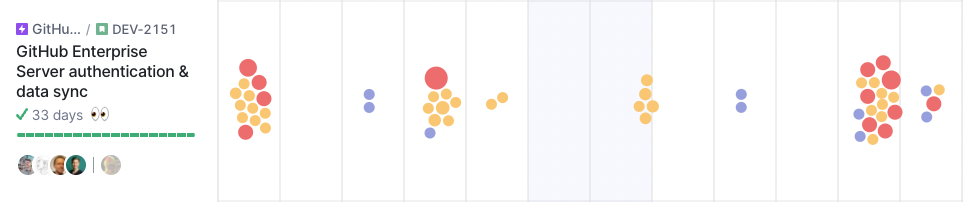
The work log helps you understand what your teams are actually working on day to day. Each dot represents a developer activity (a commit, pull request, review, or issue completion), giving you a more holistic picture of work in progress than your issue tracker alone can provide.
## How it works
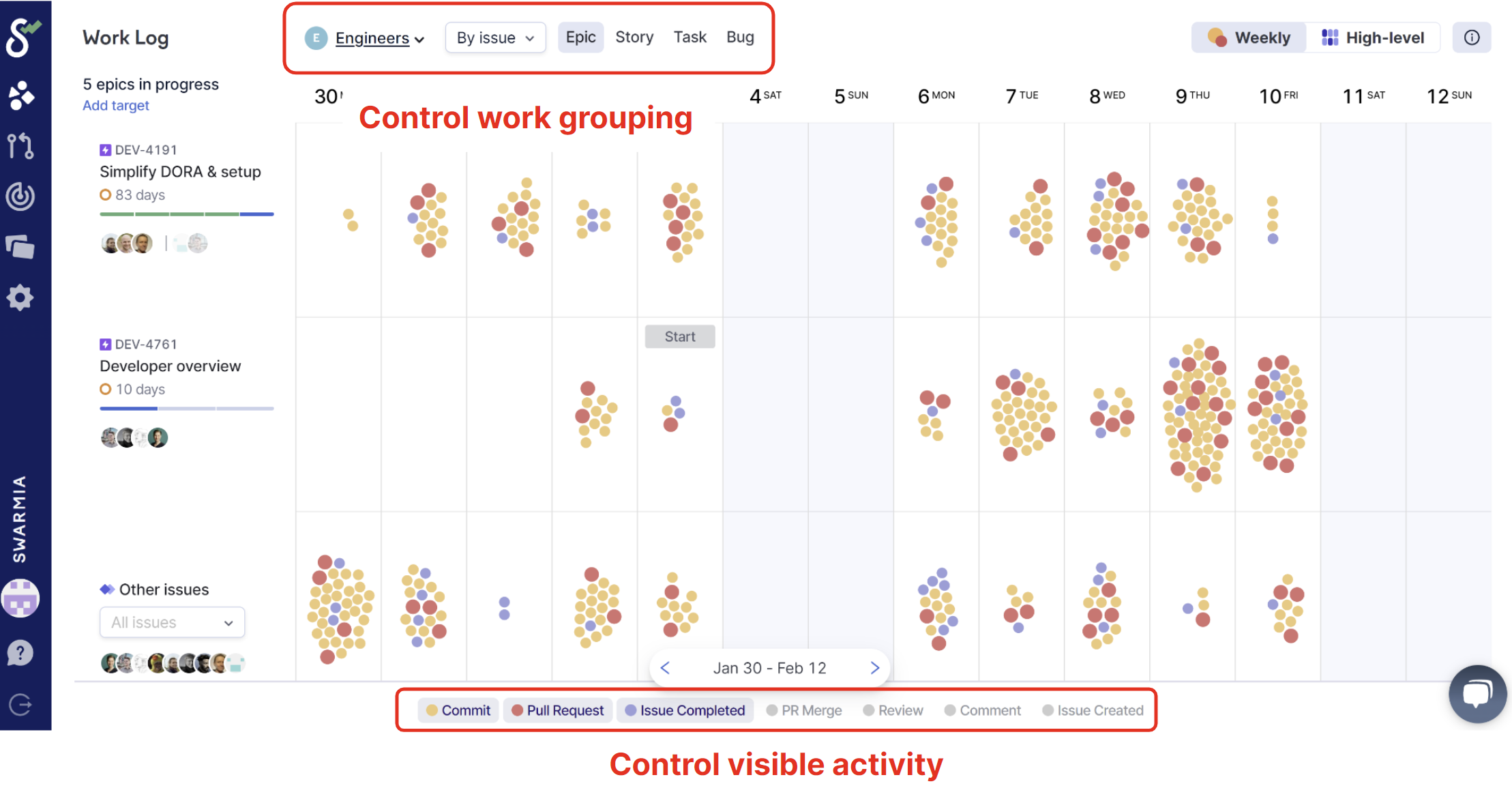
The controls at the top of the work log page give you flexibility in how you want to group the activity on the work log. The way you group your work will affect what you see on the left side, including the rows and which work activities are grouped on each row. In this example, we are grouping work by Issues and more specifically by epics. This is why we see all of the epics that had some linked activity during the visible time period.
The controls at the bottom let you select which type of activity to display in the work log. In the screenshot above, we have selected to view commits, pull requests, and issue completions.
The same controls include a **Token usage** toggle, which adds [AI token usage from your AI coding tools](/features/ai-tools/ai-cost.md#token-usage-in-the-work-log) to each day.
With epics selected as the grouping and commits, pull requests, and issue completions selected as the visible activity, we are grouping all the work linked to any epic. For Jira issues, this means child issues; for pull requests and commits, it means a direct link to the epic or to any child issue in the issue hierarchy. In practice, a pull request with a link to a Jira task linked to a story, which is again linked to an epic, will be shown as linked to that epic in the work log when grouped by epics.
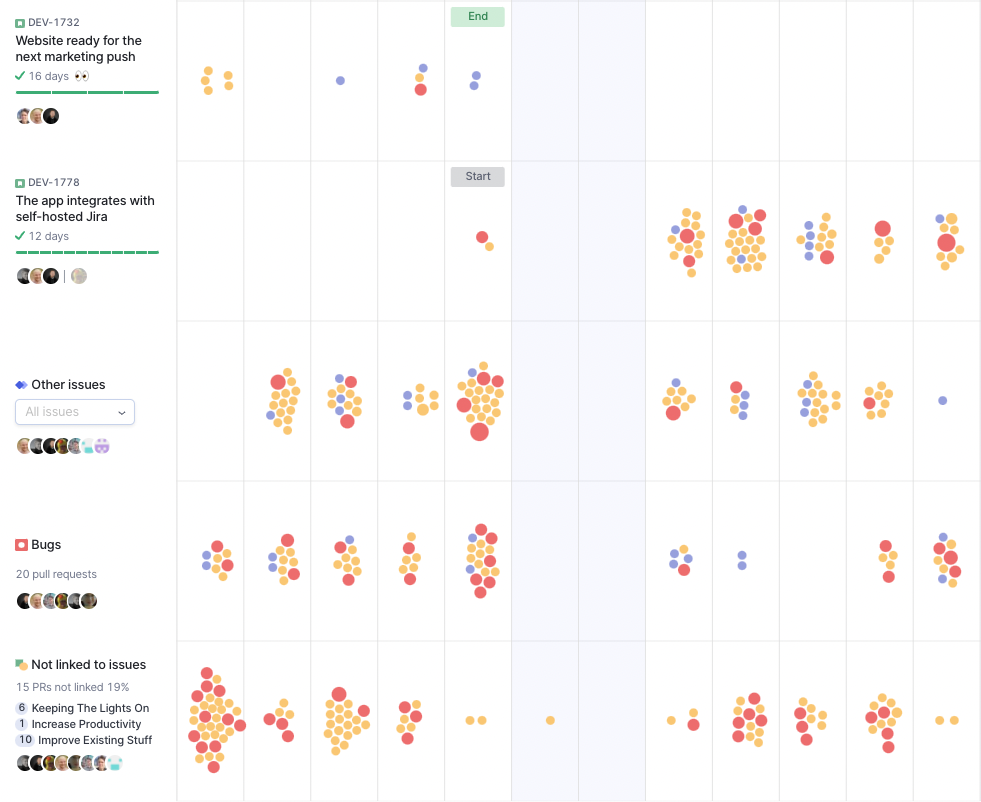
Activities that we are unable to link to any issue of the selected issue type will still be visible in their own rows on the work log.
The "Other Issues" row shows all activity linked to other issues owned by the team, but we are not grouping it by work log. For example, when grouping by epics, if the team has worked on a standalone task that is not linked to any epic, it will be shown under the "Other Issues" row.
The "Bugs" row shows all activity linked to the issue type bug. Work related to bugs is separated into its own row, since most teams want to pay special attention to how much work is tied to the bugs they have.
Finally, the "Everything else" row shows all the activity we cannot group into any of the rows above it. This can include unlinked commits and pull requests, as well as activity linked to Jira issues owned by other teams than the team we are looking at. The "Everything else" row is meant to highlight the more reactive work that might not be reflected in the team's issue tracker. This is why the work log can give you a more holistic picture of your work in progress compared to your issue tracker.
## Unhealthy patterns
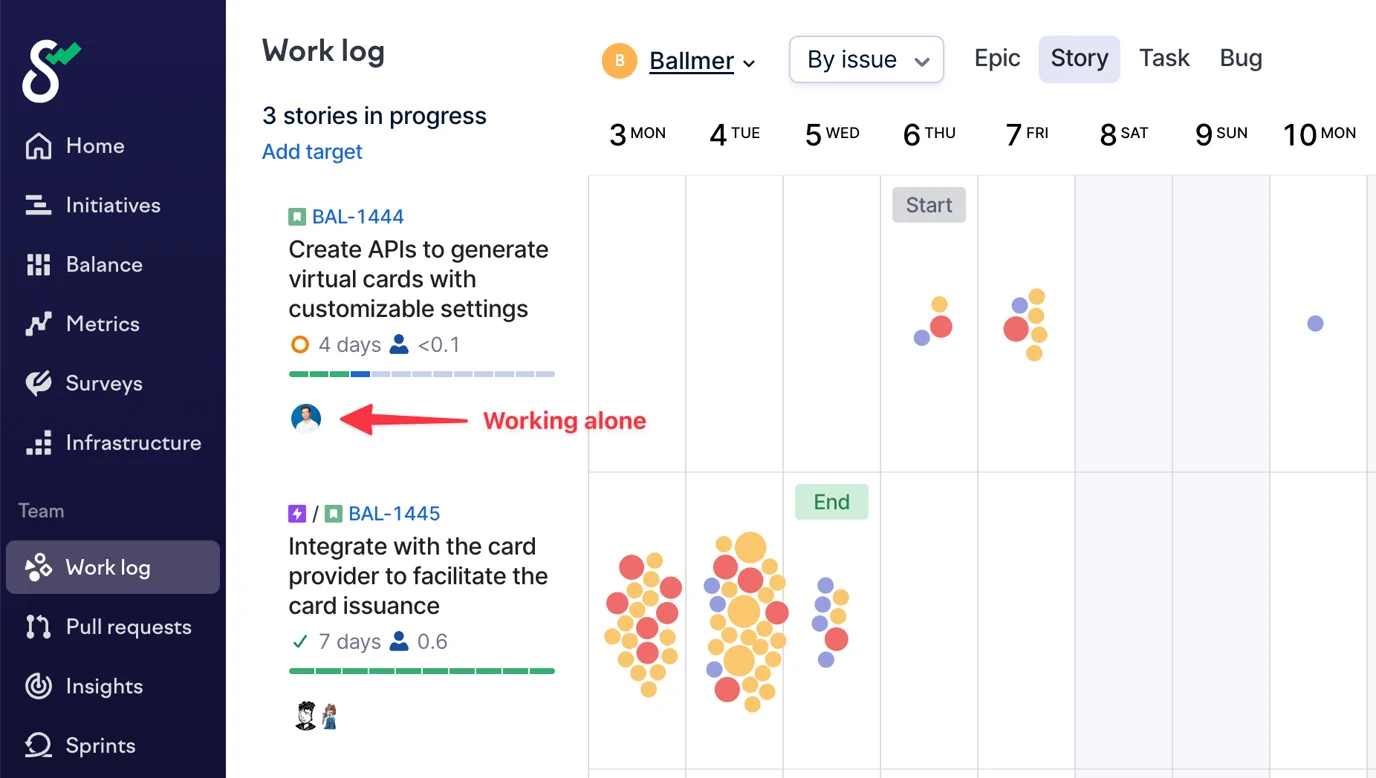
### **Working alone**
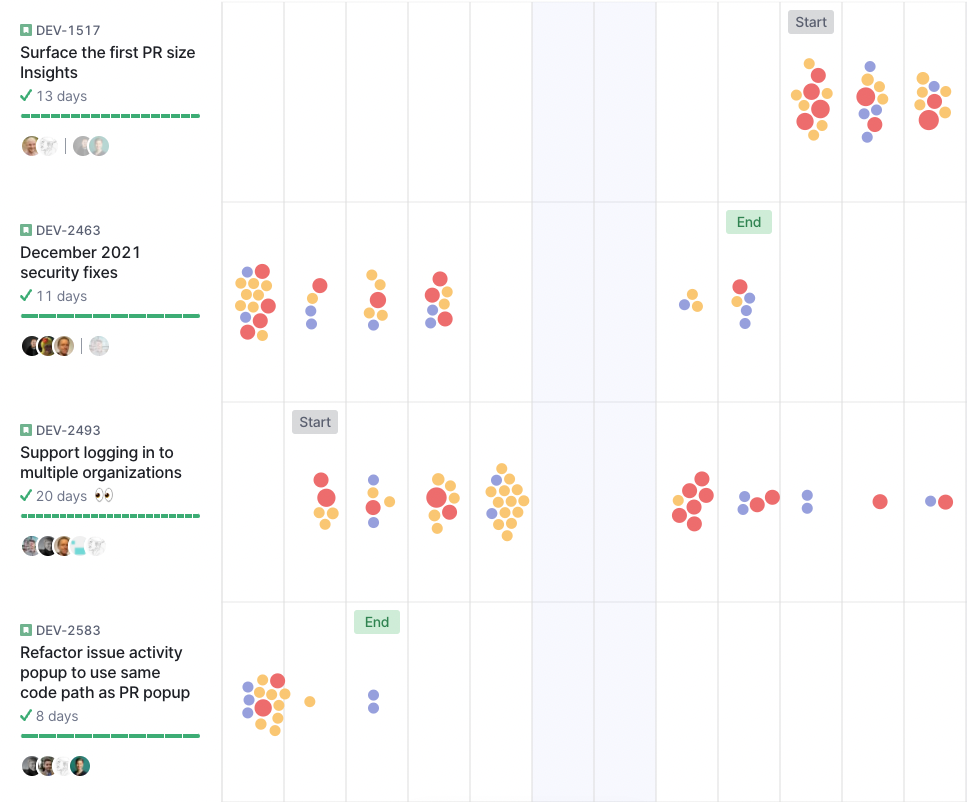
People tend to gravitate to working on their own things because it's easy and doesn't involve coordinating with others. However, great teams are built upon collaboration and sharing knowledge.
Look for epics, stories, or tasks where you can only see one author. Could they use a hand?
Being able to work on the same feature sets the bar higher for planning because you can't figure things out as you go. This is generally a good thing: better planning reduces wasteful rework, but it can feel painful at first.
### **Siloed work**
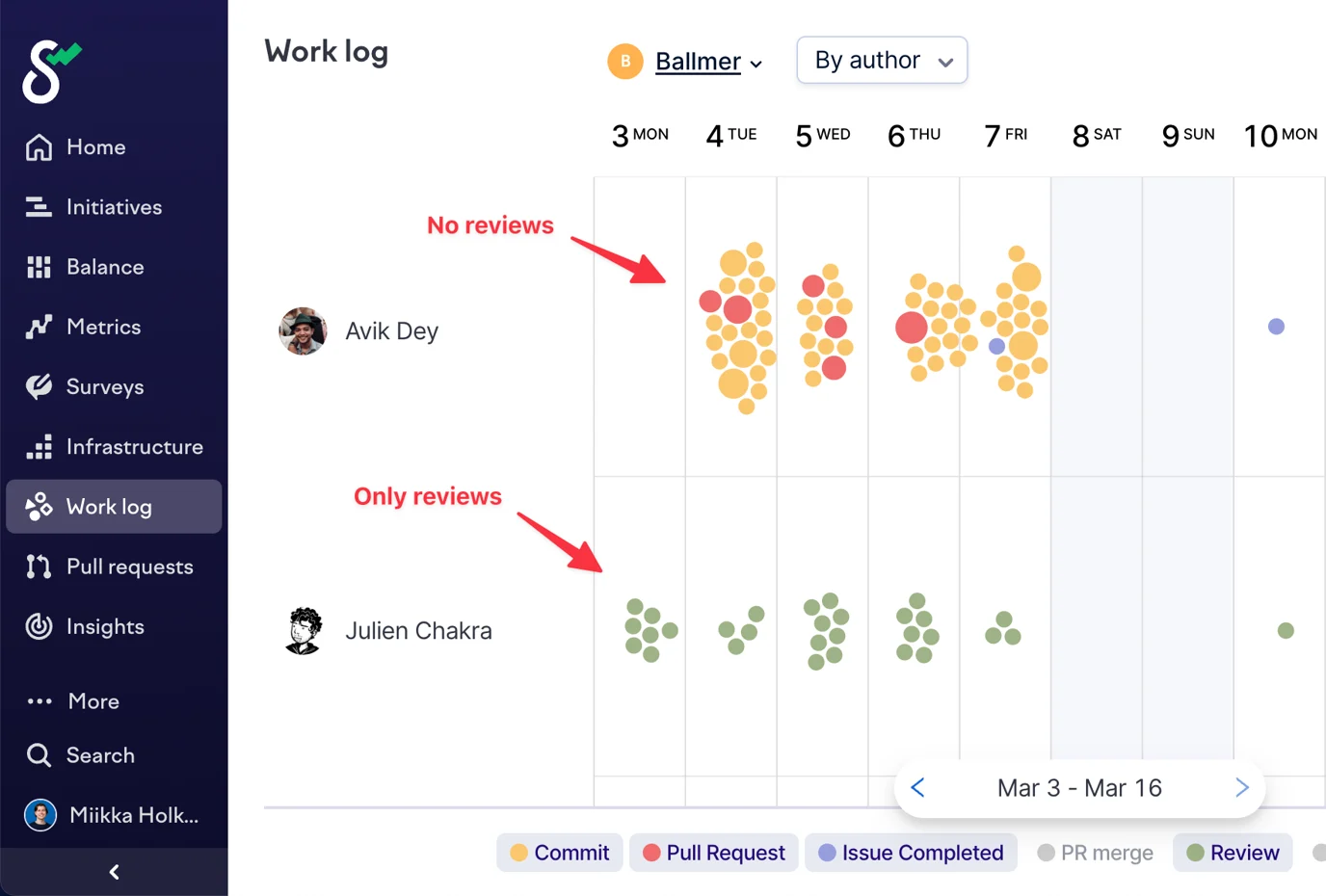
Another form of siloing is when some people always gravitate to working together on the same features or when someone is stuck only fixing bugs or reviewing code.
Look for patterns in which individual authors are only working on one kind of thing. In the example below, the bottom author is mainly reviewing code instead of a balanced mix of commits, pull requests, and reviews.
{% hint style="info" %}
Work log can also show you whether the author was on leave, if you have your [HR system connected](/settings/integrations/hr-systems.md) or you've [imported time off data](/settings/integrations/hr-systems/upload-time-off-data-via-csv.md).
{% endhint %}
### **Too much reactive work**
Housekeeping work is important to ensure the team's capability to deliver on roadmap work. But if priorities and focus are unclear, or the team is fighting fires, it can be easy to get lost in the weeds of ad hoc work.
If the work log is bottom-heavy with lots of reactive work (eg. bugs and tasks), try to correct the course by focusing more on high-impact stories and epics.
Is there a lot of bug-fixing work, and work that's not linked to any issues?
### **Multitasking and days without progress**
We're encouraged to stop starting and start finishing, but something urgent always comes up. Even short disruptions can impair flow, and context switching is expensive.
Is the team getting interrupted or working on too many things at the same time? Or has the team a habit of creating larger commits and Pull Requests?
## Healthy patterns
### **Team collaboration**
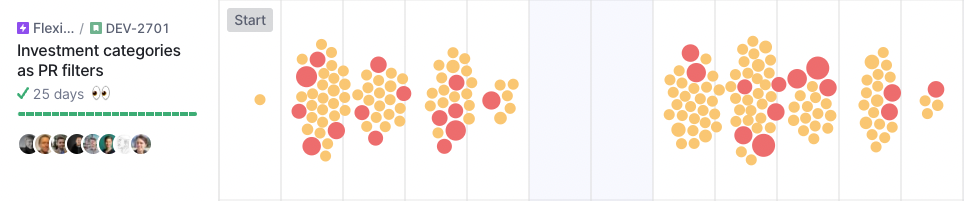
Issues that the team collaborates on are more likely to be completed faster and are usually more fun to work on due to social interaction, knowledge sharing, and quicker reviews.
Look for stories with a high amount of collaborators, and continuous delivery (commits happening regularly every day).
Plan for collaboration (eg. when breaking work into tasks) to increase the odds of collaboration.
### **Increasing focus on the biggest priorities**
Limiting the amount of work is another way to increase team collaboration, and complete batches of work faster. This helps drive focus which ensures the team can progress in their most important priorities.
Again, ensure the stories get continuous progress and little to no empty days. Additionally, look for a step pattern. If there is one, the team transitions well between stories and takes the time to finish work before jumping on to the next topic.
---
# Agent Instructions
This documentation is published with GitBook. GitBook is the documentation platform designed so that both humans and AI agents can read, navigate, and reason over technical content effectively. Learn more at gitbook.com.
## Querying This Documentation
If you need additional information that is not directly available in this page, you can query the documentation by asking a question.
Perform an HTTP GET request on the following URL with the `ask` and `goal` query parameters:
```
GET https://help.swarmia.com/features/focus/analyzing-the-activity-patterns-on-work-log.md?ask=&goal=
```
`ask` is the immediate question: it should be specific, self-contained, and written in natural language.
`goal` is what the user is ultimately trying to achieve, the reason they need the answer. Sharing it helps GitBook give you a better, more relevant answer. A goal is most helpful when it describes the outcome the user wants rather than restating the question. For example, with `ask=how do I create an API token`, a goal like `automate deployments from our CI pipeline` lets GitBook tailor the answer to that use case.
The response will contain a direct answer to the question and relevant excerpts and sources from the documentation.
Use this mechanism when the answer is not explicitly present in the current page, you need clarification or additional context, or you want to retrieve related documentation sections.