> For the complete documentation index, see [llms.txt](https://help.swarmia.com/llms.txt). Markdown versions of documentation pages are available by appending `.md` to page URLs; this page is available as [Markdown](https://help.swarmia.com/definitions/frequently-asked-questions/how-do-i-configure-swarmia-if-i-use-the-gitflow-branching-strategy.md).
# How do I configure Swarmia if I use the Gitflow branching strategy?
[Gitflow](https://nvie.com/posts/a-successful-git-branching-model/) is a branching model often used with scheduled release cycles to define a set of features as a release. Work is done in *feature* branches that are reviewed and merged to the *develop* branch when they are ready for production. To release a collection of features, the develop branch is merged to the *main* branch.
Because each change is merged twice (first from the feature to develop, and then to main), we need to account for that to avoid double-counting and get accurate [pull request cycle times](/features/metrics/pull-request-cycle-time.md) and [change lead times](/definitions/dora-metrics/change-lead-time.md).
## Excluding pull requests from *develop* to *main*
Since the pull requests from develop to main represent releases instead of feature work and often tend to be open for extended periods, we recommend [excluding them from your metrics](/settings/organization/pull-request-data-quality.md). You can simply set up an exclusion rule based on the develop branch name. (The branch name condition considers the head branch, i.e., the branch you're merging into the base branch.)
Now, your pull request metrics represent the work in feature branches, considering the [pull request cycle time](/features/metrics/pull-request-cycle-time.md) until changes are merged into the develop branch, i.e., reviewed and ready for production.
## Deployment metrics
In addition to knowing how long it took for you to get the feature branch merged, it's also important to know the [change lead time](/definitions/dora-metrics/change-lead-time.md), i.e., the time it took from starting to work on the feature branch all the way until it was deployed to production.
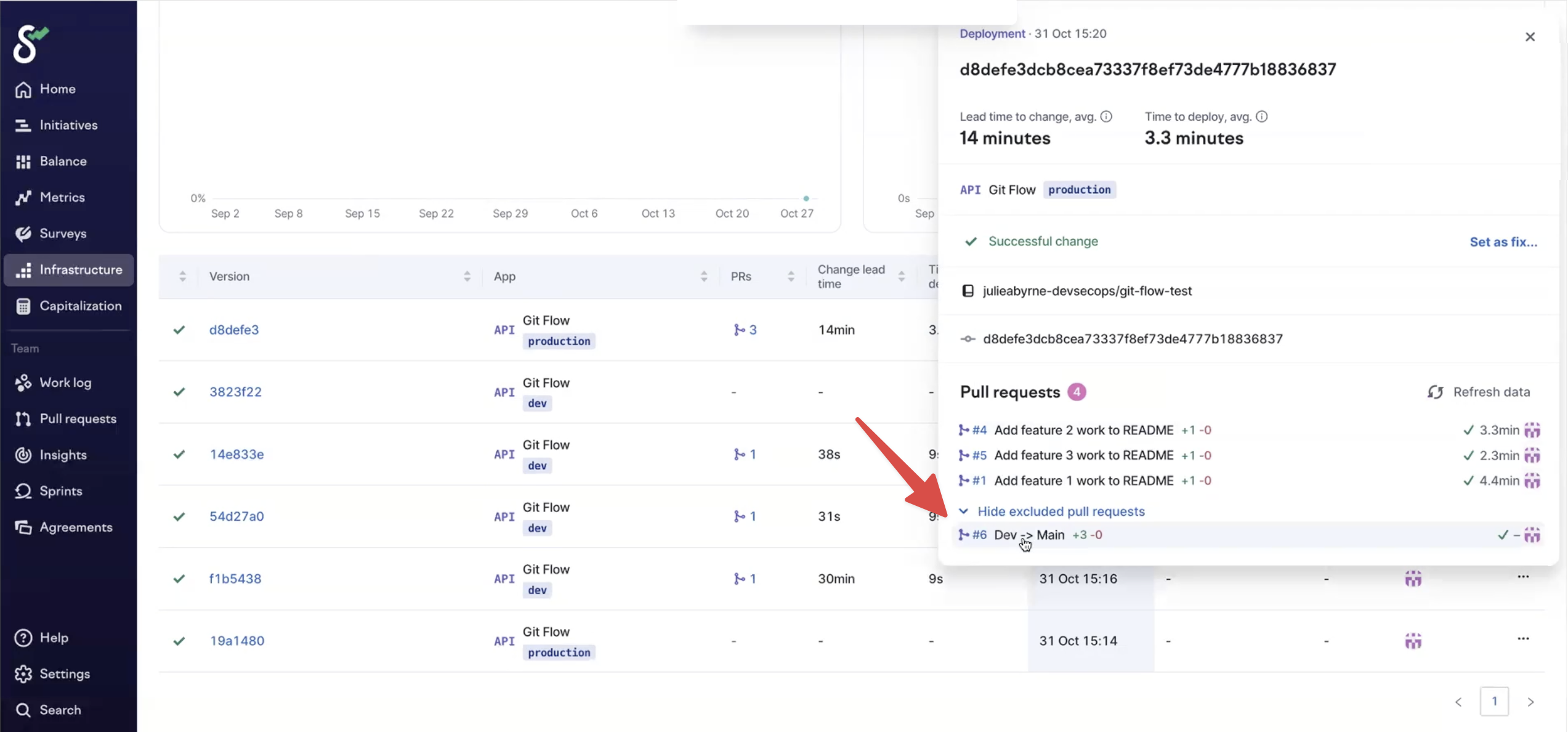
Whenever there's a new deployment, [Swarmia automatically finds](/features/metrics/track-dora-metrics/how-swarmia-links-prs-to-deployments.md) the pull requests that were merged since the previous deployment, considering the pull request exclusions you configured in the previous step. That means you can see all the feature branch PRs included in each deployment.
The release PR (deploy → main) is excluded from the metrics, but you can see it under "Show excluded pull requests" in the deployment popup.
---
# Agent Instructions
This documentation is published with GitBook. GitBook is the documentation platform designed so that both humans and AI agents can read, navigate, and reason over technical content effectively. Learn more at gitbook.com.
## Querying This Documentation
If you need additional information that is not directly available in this page, you can query the documentation by asking a question.
Perform an HTTP GET request on the following URL with the `ask` and `goal` query parameters:
```
GET https://help.swarmia.com/definitions/frequently-asked-questions/how-do-i-configure-swarmia-if-i-use-the-gitflow-branching-strategy.md?ask=&goal=
```
`ask` is the immediate question: it should be specific, self-contained, and written in natural language.
`goal` is what the user is ultimately trying to achieve, the reason they need the answer. Sharing it helps GitBook give you a better, more relevant answer. A goal is most helpful when it describes the outcome the user wants rather than restating the question. For example, with `ask=how do I create an API token`, a goal like `automate deployments from our CI pipeline` lets GitBook tailor the answer to that use case.
The response will contain a direct answer to the question and relevant excerpts and sources from the documentation.
Use this mechanism when the answer is not explicitly present in the current page, you need clarification or additional context, or you want to retrieve related documentation sections.