> For the complete documentation index, see [llms.txt](https://help.swarmia.com/llms.txt). Markdown versions of documentation pages are available by appending `.md` to page URLs; this page is available as [Markdown](https://help.swarmia.com/definitions/developer-effort-ftes.md).
# Developer effort (FTEs)
Learn how developer effort is measured in Swarmia
Swarmia measures developer effort in FTEs (full-time equivalents) to help you understand how your team's time and effort are being spent across different projects and initiatives. This core metric helps teams use Swarmia to [balance engineering investments](/features/focus/balance-engineering-investments.md) or [improve team focus](/guides/improve-your-teams-focus.md).
### How is effort measured in Swarmia?
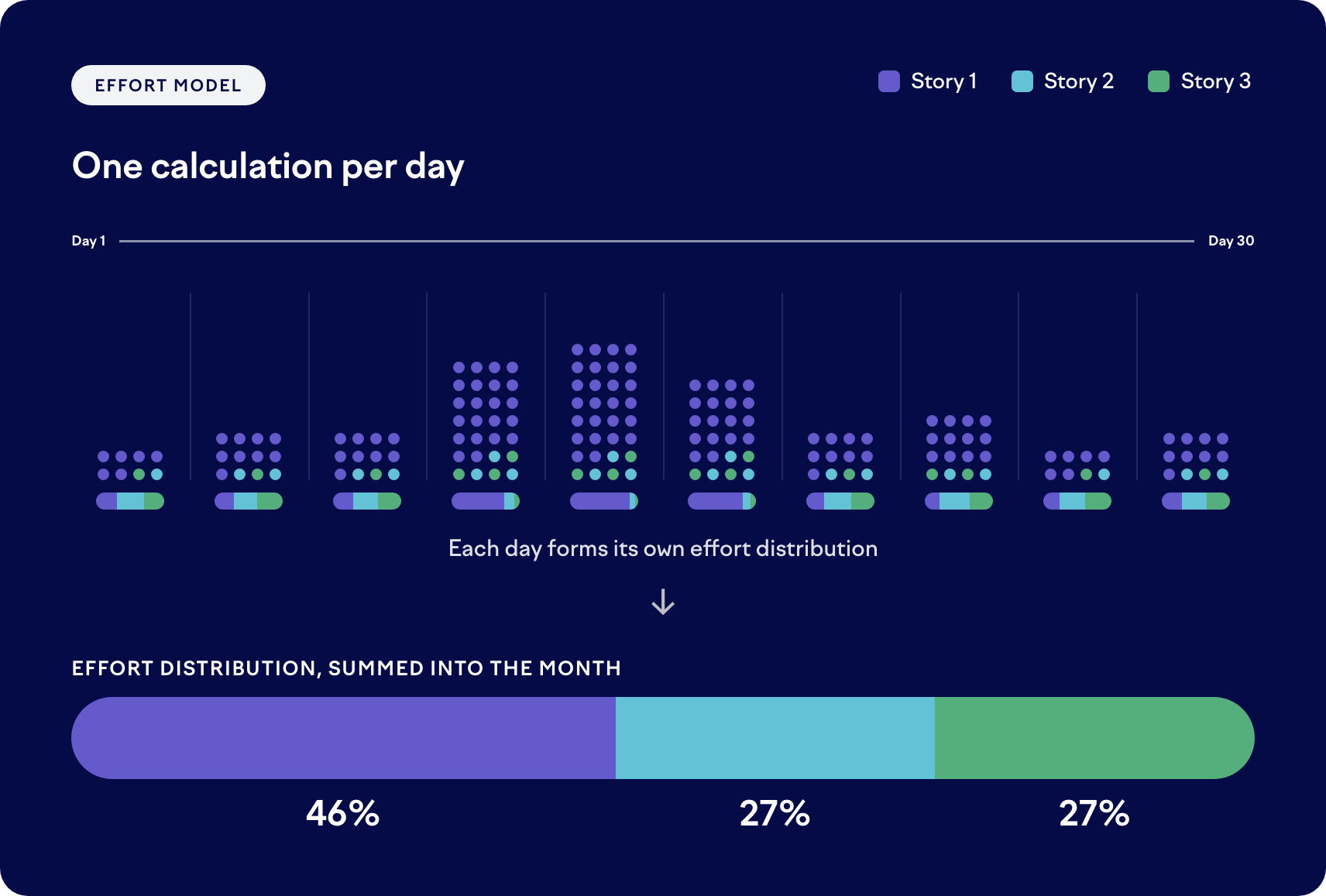
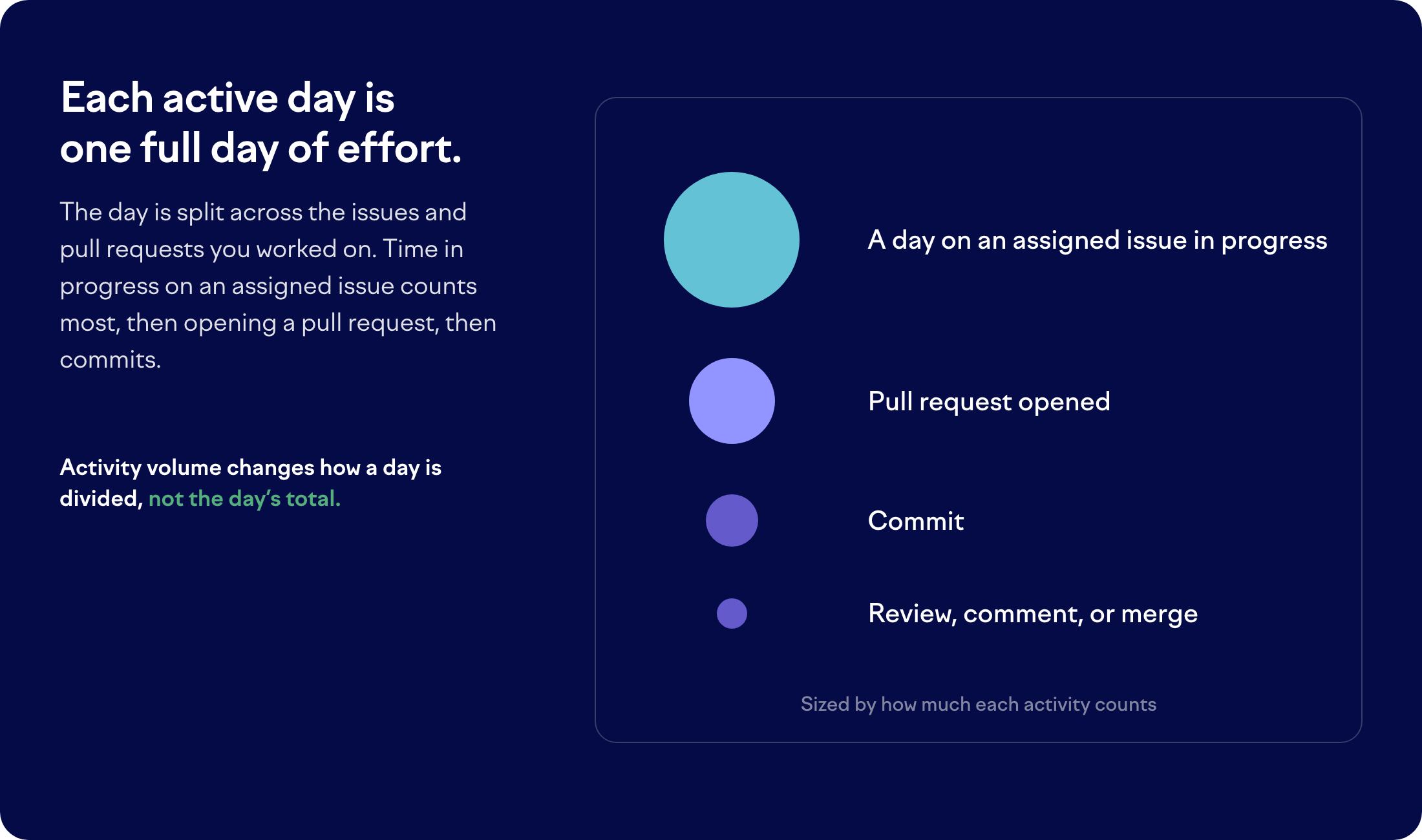
Swarmia measures effort one working day at a time. Every working day you were active counts as one full day of effort, and that day is split across the issues and pull requests you worked on.
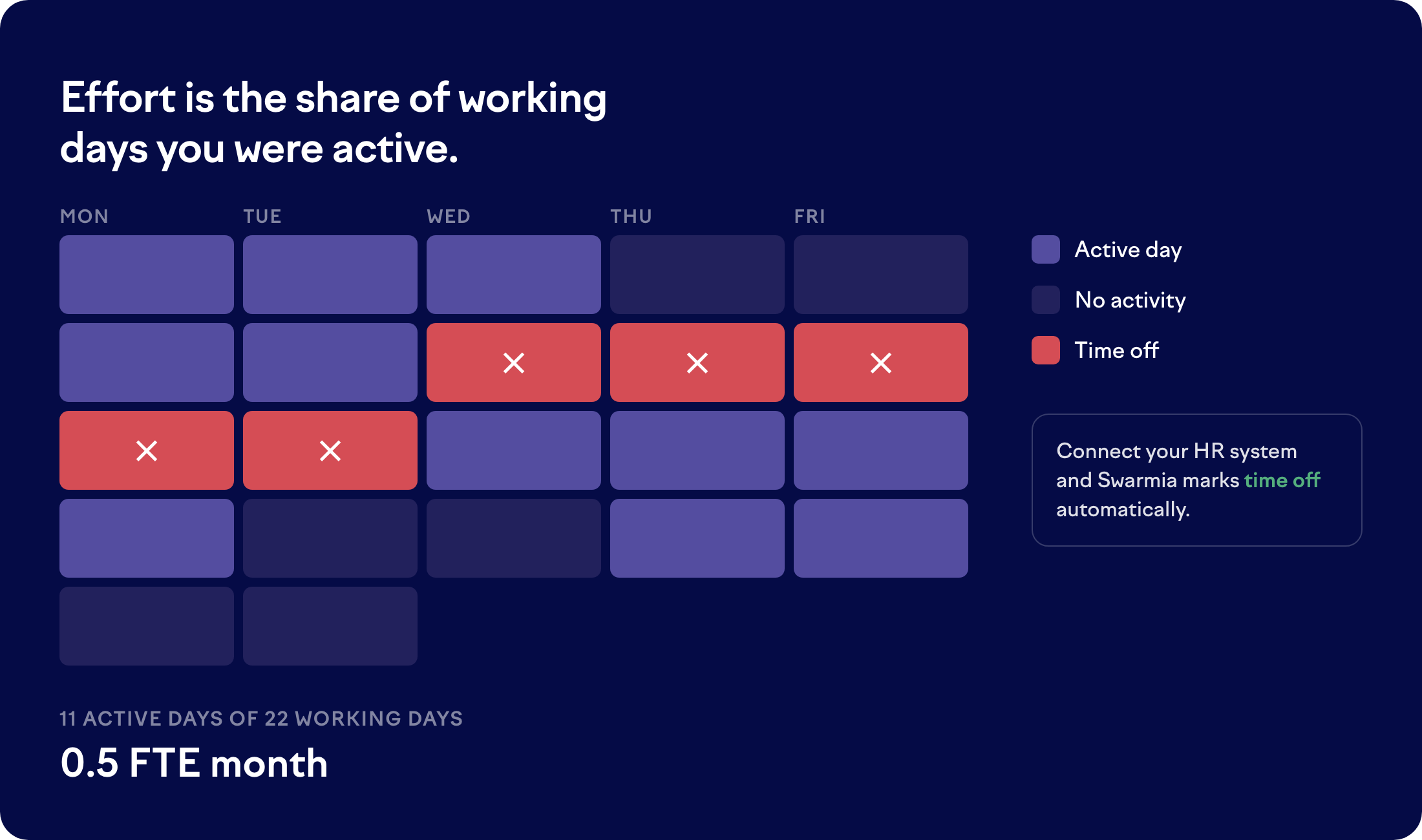
Monthly effort is the share of the month's working days you were active. An engineer active on 11 of a month's 22 working days gets 0.5 FTE.
Swarmia weighs activities differently when it divides a day. Time in progress on an assigned issue counts most, then opening a pull request, then commits. Reviews, comments, and merges count least. Each day an issue is assigned to an engineer and set to in progress generates an event, which allocates effort to work that has no direct code contribution. [See how long an assigned issue keeps counting](#assigned-issues-in-progress).
How much activity happened on a day changes only how that day gets divided, never the day's total. One busy day can't take over the month.
Two rules follow from measuring days rather than months:
* Every working day without activity counts as zero. There's no threshold to cross first, so a quiet week lowers effort right away.
* Swarmia measures monthly effort from Monday to Friday, so weekend activity doesn't add to the month's total.
### Assigned issues in progress
An issue that's assigned to an engineer and set to in progress earns effort on its own. This is how work that never reaches a pull request still counts.
Two rules limit how long a single issue keeps generating events:
* **Five working days without activity.** Only work on a pull request linked to the issue counts: opening it, commits, reviews, and comments. The issue stops generating events five working days after the engineer's last one. Their next restarts the five days.
* **Only the issues an engineer works on directly.** An issue that has child issues generates no events of its own. The child issues do.
Time in progress doesn't matter on its own. An issue open for months keeps earning effort as long as someone works on it every week.
Events only cover days an issue was both assigned and in progress, so unassigning an issue or moving it out of in progress ends them right away.
There are several ways to improve the accuracy of effort calculation:
### Part-time employees
Each author has an FTE allocation that scales every active day. An allocation of 0.5 means each active day counts as half a day of effort.
Monthly effort already comes from the days someone was active, so whether a part-time engineer needs an allocation depends on how their hours are arranged:
* **Fewer working days.** Someone who works Monday to Wednesday has no activity on Thursday or Friday, so the daily model already lowers their effort to around 0.6 FTE. Leave their allocation at 1.0. Setting it to 0.6 as well would reduce their effort twice, down to 0.36.
* **Shorter days.** Someone who works four hours every weekday is active on every working day, so the model sees a full month. Set their allocation to 0.5, because Swarmia measures whole days and can't see the hours within a day.
Any activity on a day off counts as a full active day, so effort reads higher than expected if a part-time engineer answers a review comment outside their working days.
You can [adjust each author's FTE allocation in settings](https://app.swarmia.com/settings/authors).
### Occasional authors
Occasional authors aren't excluded. They land on small numbers instead, so someone active on 2 of 22 working days gets 0.09 FTE. If an author doesn't work as an engineer and you don't want them in effort at all, set their FTE allocation to 0.
### Non-developers
By default, Swarmia only counts authors with a linked GitHub or GitLab user account. Product managers, designers, QA engineers, and anyone else whose work lives only in your issue tracker earn no effort, even when they have issues assigned to them.
To count them, [open your organization settings](https://app.swarmia.com/settings/organization) and turn on **Include non-developers in the effort model**. Only admins can change this setting.
These people then earn effort the same way as everyone else: each day an issue is assigned to them and set to in progress counts as an active day. Authors who already have a linked GitHub or GitLab account are unaffected.
Turning the setting on or off recalculates past effort across your organization.
### Bots
Bots are excluded, so nothing a bot does earns effort. Human activity on bot-authored pull requests does count, including reviews. This matters when coding agents open pull requests for your team to review.
### Vacations, sick leaves, and time off
Swarmia supports multiple ways to account for vacations, sick leave, and time off.
If an [HR system is connected to Swarmia](/settings/integrations/hr-systems.md), then vacations, sick leaves, and time off are taken into account:
* A day covered by approved time off produces no effort, so it counts the same as any other day without activity.
* Time offs can be specified in either days or hours:
* When specified in days, each day counts as a full day off
* When specified in hours, any partial day off (including half-days) is counted as a full day off
* For example, in a month with 20 working days, an engineer who takes 15 days off and works the other 5 reaches 0.25 FTE.
* Weekends within the time off periods are skipped.
* Public holidays are not currently considered in the calculations. A holiday nobody worked counts as a day without activity, which produces no effort either way.
If your **HR system cannot be connected**, the time off data can also be imported [via CSV](/settings/integrations/hr-systems/upload-time-off-data-via-csv.md) or the [Time offs API](/settings/integrations/swarmia-apis/time-off-api.md).
### Other considerations
* Only authors with a linked GitHub or GitLab user account are considered, unless you [include non-developers](#non-developers). You can [review your authors in the app settings](https://app.swarmia.com/settings/authors).
* The current month fills in as it goes. Effort is divided by all the working days in the month, so a month in progress shows a partial FTE.
* Days follow your organization's timezone, so late-night activity lands on the day your organization is in.
* Effort data refreshes daily when looking at the past two months and weekly for older periods.
* Only commits that belong to a pull request are taken into account. For more information see [Why is my commit not visible in Swarmia?](/definitions/frequently-asked-questions/why-is-my-commit-not-visible-in-swarmia.md)
## What changed in the effort model
Swarmia used to calculate effort once per calendar month. Effort now moves one working day at a time, so historical figures shifted slightly. [See what changed and how the two models compare](/definitions/developer-effort-ftes/daily-effort-model.md).
## Frequently asked questions
### When does code activity become visible in Swarmia?
Swarmia can only capture code activity once a pull or merge request exists in GitHub or GitLab. Pushed commits on a branch with no open PR aren't tracked, and work that lives entirely on an engineer's machine, meaning commits that never reach GitHub or GitLab, can't count toward FTE attribution either. The model intentionally excludes pre-PR commits to avoid noise from rebases and temporary commits that may not represent real work.
An engineer's work becomes visible in Swarmia through any of the following:
* **Opening a draft PR.** This is the earliest point at which commits become visible, and the PR open event itself counts as activity.
* **Opening a PR.** The PR open event counts, and all commits on the branch become visible at the same time.
* **Pushing additional commits to an open PR.**
* **Leaving or receiving code review comments.**
* **Approving or requesting changes on a PR.**
* **Merging a PR.**
Issue-tracker work also counts: each day an issue is assigned to an engineer and set to in progress generates a comparable event, up to [five working days after their last activity on a linked pull request](#assigned-issues-in-progress).
For more on commit visibility, see [*Why is my commit not visible in Swarmia?*](/definitions/frequently-asked-questions/why-is-my-commit-not-visible-in-swarmia.md).
### Why is an engineer's FTE lower than expected?
A few common reasons:
* **They were active on fewer working days than you expected.** Effort follows the days someone worked, so scattered quiet days lower the month right away.
* **Their commits never reached GitHub or GitLab.** Local commits that were never pushed aren't visible to Swarmia.
* **Their commits are on a branch with no open PR.** Opening a draft PR is the fastest way to get earlier visibility.
* **They worked on the weekend.** Weekend activity doesn't add to the month's total.
* **They don't have a linked GitHub or GitLab user account in Swarmia.** You can [review your authors in settings](https://app.swarmia.com/settings/authors). If their work lives only in your issue tracker, you can [include non-developers in the effort model](#non-developers).
* **They had an issue sitting in progress without activity.** It stops generating effort five working days after their last commit, review, or comment on a pull request linked to it.
* **They were on time off.** Days covered by time off produce no effort, whether the data comes from your [HR system](/settings/integrations/hr-systems.md), a [CSV upload](/settings/integrations/hr-systems/upload-time-off-data-via-csv.md), or the [Time offs API](/settings/integrations/swarmia-apis/time-off-api.md).
---
# Agent Instructions
This documentation is published with GitBook. GitBook is the documentation platform designed so that both humans and AI agents can read, navigate, and reason over technical content effectively. Learn more at gitbook.com.
## Querying This Documentation
If you need additional information that is not directly available in this page, you can query the documentation by asking a question.
Perform an HTTP GET request on the following URL with the `ask` and `goal` query parameters:
```
GET https://help.swarmia.com/definitions/developer-effort-ftes.md?ask=&goal=
```
`ask` is the immediate question: it should be specific, self-contained, and written in natural language.
`goal` is what the user is ultimately trying to achieve, the reason they need the answer. Sharing it helps GitBook give you a better, more relevant answer. A goal is most helpful when it describes the outcome the user wants rather than restating the question. For example, with `ask=how do I create an API token`, a goal like `automate deployments from our CI pipeline` lets GitBook tailor the answer to that use case.
The response will contain a direct answer to the question and relevant excerpts and sources from the documentation.
Use this mechanism when the answer is not explicitly present in the current page, you need clarification or additional context, or you want to retrieve related documentation sections.