> For the complete documentation index, see [llms.txt](https://help.swarmia.com/llms.txt). Markdown versions of documentation pages are available by appending `.md` to page URLs; this page is available as [Markdown](https://help.swarmia.com/definitions/defining-issue-lifecycle-and-cycle-time.md).
# Issue cycle time
Issues progress through various stages of completeness during their lifetime. Swarmia automatically calculates key properties and metrics for each issue.
## Issue status
Every team has slightly different conventions for how they use their issue tracker. Swarmia allows you to smooth out these differences through the [status mapping configuration](https://app.swarmia.com/settings/issue-trackers) so that every issue always has one of the following statuses: **To Do**, **In Progress**, or **Done / Won't Do**. This helps make the status of work comparable across different teams in the same organization.
The progression of issues through these statuses may not always be linear - someone might start working on a bug, only to realize they're out of their depth, and leave it for someone else. In this case, the status of the issue might've gone from **To Do** to **In Progress**, and then back again to **To Do**.
## Cycle time
**The cycle time of any work is the amount of time it has spent in the In Progress status, according to your issue tracker.**
Most often, this is simply the time between starting the work (status becomes **In Progress**) and finishing it (status becomes **Done**).
More complex status histories are also accounted for. For example, if you work on an issue for 1 week, but then your priorities change, and that work is postponed for 3 months. You then start working on it again and finish it after 1 week. With this history, the issue will have a cycle time of 2 weeks, not 3½ months, as long as the issue was moved out of the **In Progress** status for the 3-month break.
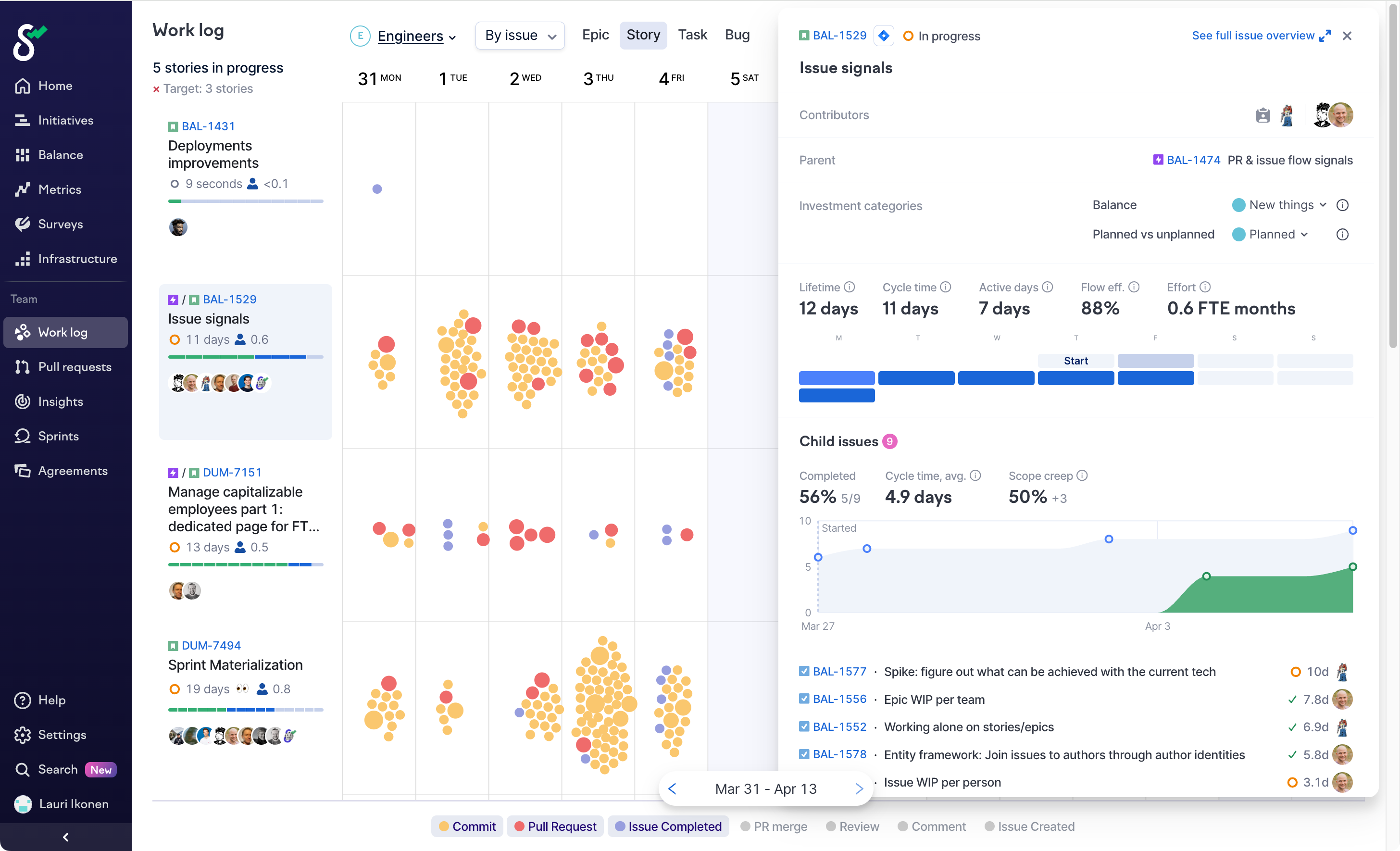
You can see when each issue went into and out of the **In Progress** status from the Issue Activity Popup (accessible by clicking on any issue key found on Swarmia).
The activity pane shows when an issue transferred into in progress with the "Start" and "End" labels.
### **Incomplete cycle times**
Swarmia also calculates incomplete cycle times for issues that are not yet **Done**. Such incomplete cycle times are clearly indicated in the UI and don't contribute to aggregate metrics such as your team's average cycle time.
### **Undefined cycle times**
If an issue moves directly from **To Do** to **Done** status, its cycle time is not defined. This may happen when someone completed their entire work on an issue without ever updating the issue tracker, and the status of the issue is later corrected.
Such undefined cycle times do not reflect reality, and also do not contribute to aggregate metrics such as your team's average cycle time.
### **Off-hours handling**
Whether weekends count toward issue cycle time depends on your organization's weekend exclusion setting. Non-business hours of the day always count toward cycle time.
You can exclude weekends from duration metrics under **Organization settings → General → Weekend Exclusion**. When **Exclude weekends from duration metrics** is enabled, Saturdays and Sundays are removed from issue cycle time. Existing and historical issues are automatically shown using the current setting.
The setting doesn't exclude evenings, public holidays, vacations, or other non-working hours. It also doesn't change the selected reporting timeframe or remove issues created or completed during a weekend.
Including off-hours may seem unintuitive, or even unfair at first, but consider the following:
* Many teams are distributed, and work may happen at various time zones
* Even co-located teams have members with different work habits: someone shows up at 7 AM, someone squeezes in a bit of work time after 9 PM after putting the kids to bed
* Different countries have different national holidays
* Teams have off-sites and trainings which are not holidays, but not regular work time either
Attempting to take all of this into account would result in a number that's too complex to understand, not comparable across teams.
---
# Agent Instructions
This documentation is published with GitBook. GitBook is the documentation platform designed so that both humans and AI agents can read, navigate, and reason over technical content effectively. Learn more at gitbook.com.
## Querying This Documentation
If you need additional information that is not directly available in this page, you can query the documentation by asking a question.
Perform an HTTP GET request on the following URL with the `ask` and `goal` query parameters:
```
GET https://help.swarmia.com/definitions/defining-issue-lifecycle-and-cycle-time.md?ask=&goal=
```
`ask` is the immediate question: it should be specific, self-contained, and written in natural language.
`goal` is what the user is ultimately trying to achieve, the reason they need the answer. Sharing it helps GitBook give you a better, more relevant answer. A goal is most helpful when it describes the outcome the user wants rather than restating the question. For example, with `ask=how do I create an API token`, a goal like `automate deployments from our CI pipeline` lets GitBook tailor the answer to that use case.
The response will contain a direct answer to the question and relevant excerpts and sources from the documentation.
Use this mechanism when the answer is not explicitly present in the current page, you need clarification or additional context, or you want to retrieve related documentation sections.